Apps over WiFi and BLE
WiCAN PRO works with the OBD and CAN apps you already use. Out of the box it is an ELM327 WiFi adapter for Car Scanner, Torque and the like; a connection row turns it into a RealDash, SavvyCAN or slcan device, over WiFi or Bluetooth.
Connections: how apps reach the car
Settings › Connections is where a vehicle interface is wired to a way in. Each row has two ends:
- The interface: the OBD chip (the ELM327-compatible interpreter, which talks every OBD protocol) or the CAN bus (WiCAN's own CAN controller, raw frames).
- The connection: a TCP or UDP port, a WebSocket path, Bluetooth, or the USB serial link. Ports and paths are created automatically.
Between the two sits a protocol: plain ELM327 text for the OBD chip; for the CAN bus a choice of slcan, GVRET (SavvyCAN), RealDash frames, or a compact binary record with timestamps for your own tools. The OBD chip and the CAN bus can feed several connections at once; a port, a path, Bluetooth or USB carries one connection each. Rows apply from Submit (WiCAN restarts).
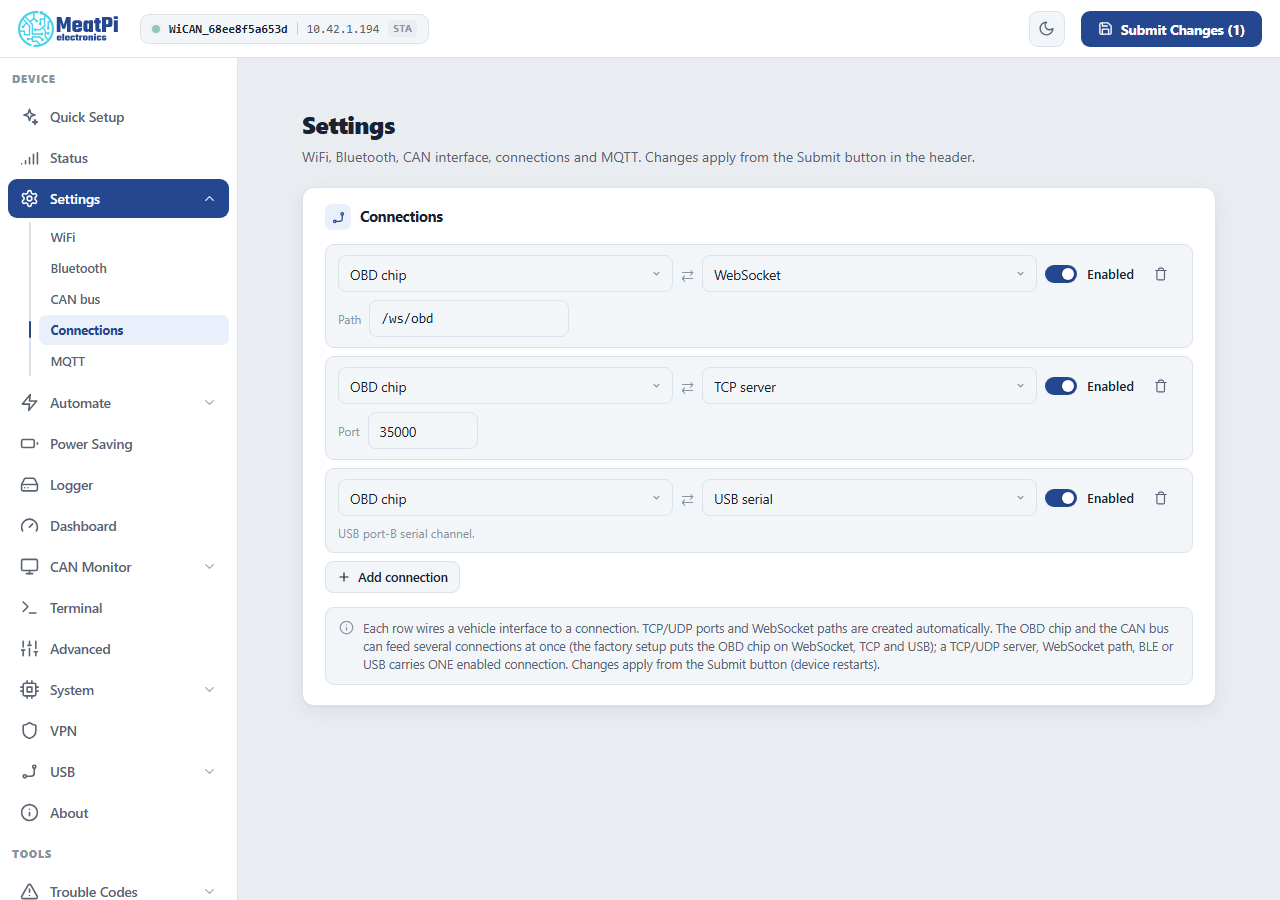
The factory setup puts the OBD chip on three connections at once:
| Connection | Where | For |
|---|---|---|
TCP port 35000 |
WiFi (the access point or your network) | ELM327 apps: the classic WiFi OBD adapter address 192.168.0.10:35000 |
WebSocket /ws/obd |
WiFi | browser apps and the web interface's own tools |
| USB serial | the USB connector in device mode | a PC with a cable |
Three more servers exist for the CAN bus, switched off: TCP 3333 (slcan), TCP 23 (GVRET), UDP 17. A server on its own carries nothing: switched on without a connection row, it accepts a client and sends it no data. What turns slcan or GVRET on is the row (CAN bus › TCP 3333, protocol slcan, for instance), and the row switches its server on by itself. A server left on with no row is flagged under Settings › Connections and in the device log.
AutoPID steps aside
While an app talks to the OBD chip, WiCAN's own polling pauses and resumes 10 seconds after the app's last command, so the two never talk over each other. Dashboard values and Home Assistant updates stop meanwhile.
Car Scanner, Torque and other ELM327 apps
Nothing to configure on WiCAN. In the app, add a WiFi adapter:
| App setting | On WiCAN's access point | On your home network |
|---|---|---|
| Connection type | WiFi | WiFi |
| Address | 192.168.0.10 |
WiCAN's address on your network (the Status page shows it) |
| Port | 35000 |
35000 |
The phone must be on the same network as WiCAN: joined to WiCAN's access point, or on the home network WiCAN is on. In Station only mode the access point is off, so it is the home network.
Over Bluetooth: add a connection with the OBD chip on Bluetooth, turn Bluetooth on (Bluetooth LE), pair the phone, then choose a Bluetooth LE adapter in the app and pick WiC_<device id>. Remember that WiFi pauses while the phone is connected over Bluetooth.
RealDash
RealDash can use WiCAN two ways:
- As an OBD2 adapter (no WiCAN setup): in RealDash, Garage › your dashboard › Add connection › Adapters (OBD2) › WiFi, address
192.168.0.10(or the home network address), port35000. Pick the car's OBD2 protocol in the connection settings and enable Request Only First Reply. - As a RealDash CAN device (raw frames, for a RealDash XML channel file): on WiCAN add a connection with the CAN bus, protocol RealDash, on a TCP port of your choice, enable the CAN bus under Settings › CAN bus with the car's bit rate, and Submit. In RealDash: Add connection › Adapters (CAN/LIN) › RealDash CAN › WIFI/LAN › WiCAN's address and that port. Bluetooth works the same way with a Bluetooth connection on WiCAN (Android and iOS; RealDash on Windows uses WiFi only).
SavvyCAN
SavvyCAN speaks GVRET. On WiCAN add a connection with the CAN bus, protocol GVRET, TCP port 23 (the prepared server), enable the CAN bus with the car's bit rate, Submit. In SavvyCAN: Connection › Open Connection Window › Add New Device › Network Connection; on the same network it finds WiCAN by itself, otherwise type the address. Create New Connection, then tick Enable Bus.
SocketCAN on Linux
WiCAN as a can0 interface, over the slcan protocol. On WiCAN add a connection with the CAN bus, protocol slcan, TCP port 3333, enable the CAN bus with the car's bit rate, Submit. On the Linux machine, make the TCP stream a serial port and attach slcand to it (replace the address with WiCAN's address on your network when it is not the access point):
sudo socat pty,link=/dev/netcan0,raw tcp:192.168.0.10:3333 &
sudo slcand -o -c -s8 /dev/netcan0 can0
sudo ip link set can0 txqueuelen 1000
sudo ip link set can0 up
-s8 is slcand's code for 1 Mbit/s; it only tells slcand the rate WiCAN is already using (-s6 is 500 kbit/s, -s5 250 kbit/s). Then candump can0, cansend, python-can and the rest work as on any CAN interface.
BUSMASTER
BUSMASTER connects through the VSCom CAN-API driver to an slcan stream. On WiCAN add a connection with the CAN bus, protocol slcan, TCP port 3333, enable the CAN bus, Submit. In BUSMASTER: Driver Selection › VSCom CAN-API, then Channel Configuration › Advanced, address and port 192.168.0.10:3333, tick Hardware Timestamps, choose the bit rate, OK and Connect.
Your own program
- ELM327 over TCP: connect to port
35000, sendATZ\r, then OBD requests such as010C\r; read until the>prompt. The dialect is ELM327 ASCII. - Raw CAN with timestamps: a CAN bus connection with the binary record protocol gives 10 to 18 bytes per frame with the bus-side receive time, described under the data pipe (the same bytes flow over TCP, WebSocket or Bluetooth).
- Everything else (status, settings, files, the UDS terminal, scripts): the HTTP API, also over Bluetooth.
Troubleshooting
| Symptom | Likely cause | What to do |
|---|---|---|
| The app cannot connect | the phone is not on WiCAN's network, or the port is wrong | check the phone's WiFi; 35000 for ELM apps, the port of your connection row otherwise |
| The app connects but gets no data | ignition off, or a CAN connection with the CAN bus disabled or at the wrong bit rate | ignition on; Settings › CAN bus enabled with the car's rate, or auto |
| Two apps fight over the chip | the OBD chip answers one conversation at a time | one OBD app at a time; CAN connections can run beside it |
| Dashboard values freeze while the app runs | expected: AutoPID yields to the app | they resume 10 seconds after the app's last command |