AutoPID
AutoPID is the loop that asks your car for values and turns the answers into named parameters: RPM, speed, coolant temperature, state of charge. Everything else in WiCAN (the Dashboard, Home Assistant, MQTT, the logger, the rules) works from those parameters. The web interface calls the whole area ==Automate==.
What it does
Every polling round WiCAN sends one request per enabled parameter to the car, decodes each reply with an expression, and publishes the value. Where a value comes from decides which tab it lives on:
| Tab | Rows | Where they come from |
|---|---|---|
| Standard PIDs | the OBD-II values every car must answer, as far as yours supports them | detected by the scan, decoded by WiCAN's built-in table |
| Vehicle Specific | the values only your make and model carry, such as battery state of charge | a vehicle profile from the MeatPi profile list |
| Custom PIDs | requests you write yourself, with your own decoding | you |
| Raw Config | the same tables as one JSON document | for copying between devices and for the adventurous |
All rows belong to the current vehicle. WiCAN keeps up to 8 vehicles, each with its own protocol, rows and profile, and switches when another known car answers.
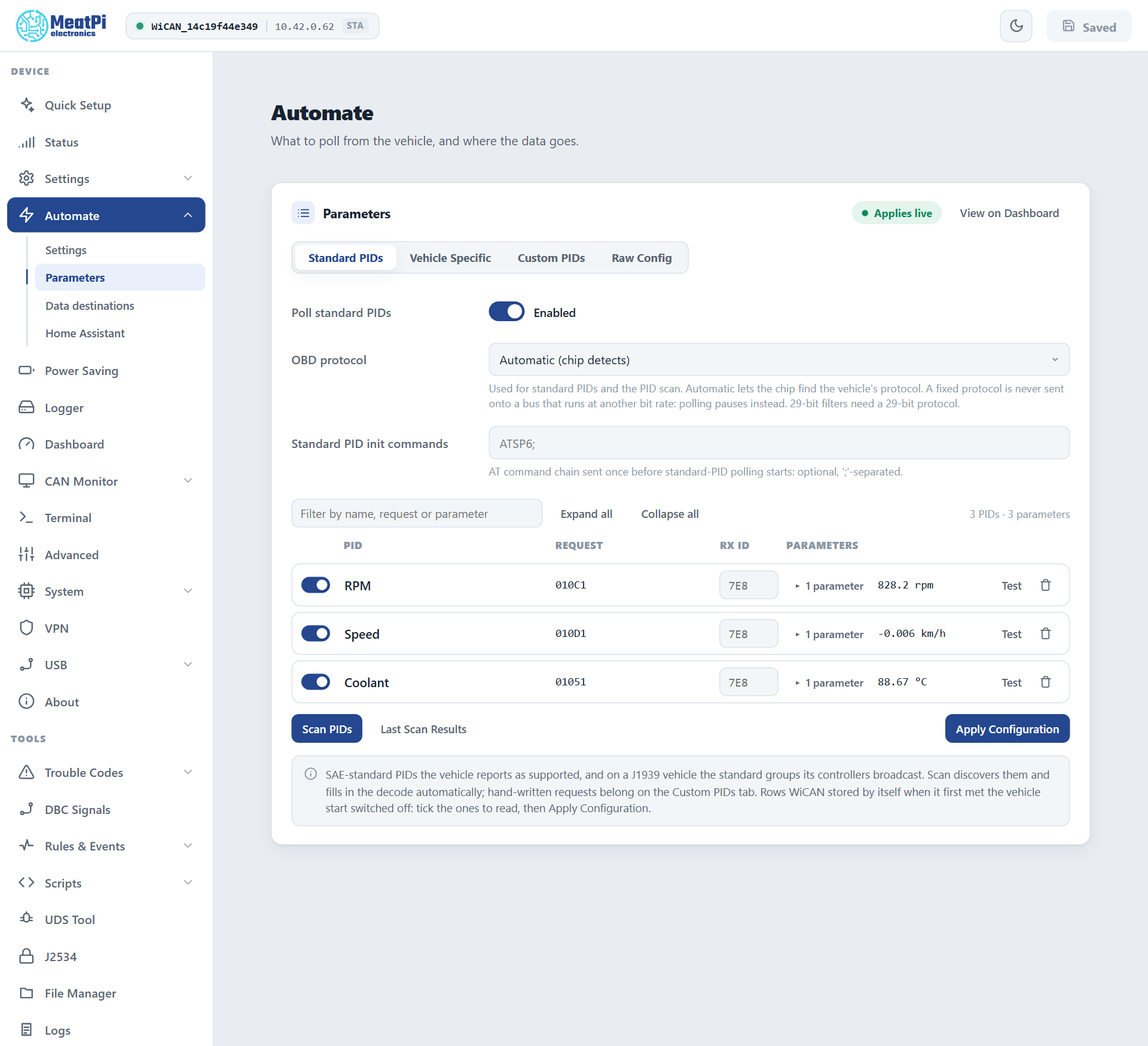
The Parameters page
Automate › Parameters. Changes on this page apply live when you press Apply Configuration: no restart.
Standard PIDs
- Poll standard PIDs switches the whole tab on or off.
- OBD protocol: Automatic lets the OBD chip find the car's protocol; or pin one of the four CAN variants (11-bit or 29-bit ids, 500 or 250 kbit/s). A pinned protocol is never sent onto a bus that runs at another bit rate: polling pauses instead.
- Standard PID init commands: an optional chain of AT commands sent once before standard polling starts, separated by
;. - The rows: a switch, the name, the request, the responding ECU id, the parameters with their live values, Test (sends that one request now and shows the raw reply and the decoded value), delete.
- Scan PIDs runs the detection again; Last Scan Results shows what the car answered. Rows WiCAN stored by itself when it first met the vehicle start switched off: tick the ones to read, then Apply Configuration.
Vehicle Specific: the profile chosen for this car and its rows. A profile is picked in Quick Setup or here; it is saved under the car and applied again whenever that car answers. See Vehicle profiles.
Custom PIDs: your own rows. A row is a request (221E3B, 0105), an optional init chain sent before it, an optional expected response id, and one or more parameters, each with a name, an expression over the reply bytes (B0, B1, ... and [B2:B3] for a 16-bit value), a unit and a class. Rows sit in groups; a group has a period, so slow values can be asked less often than fast ones.
Raw Config: the tables as JSON, the same document GET /api/autopid/config returns. Paste one from another device or a profile and apply.
The Automate settings
Automate › Settings, applied from Submit in the header.
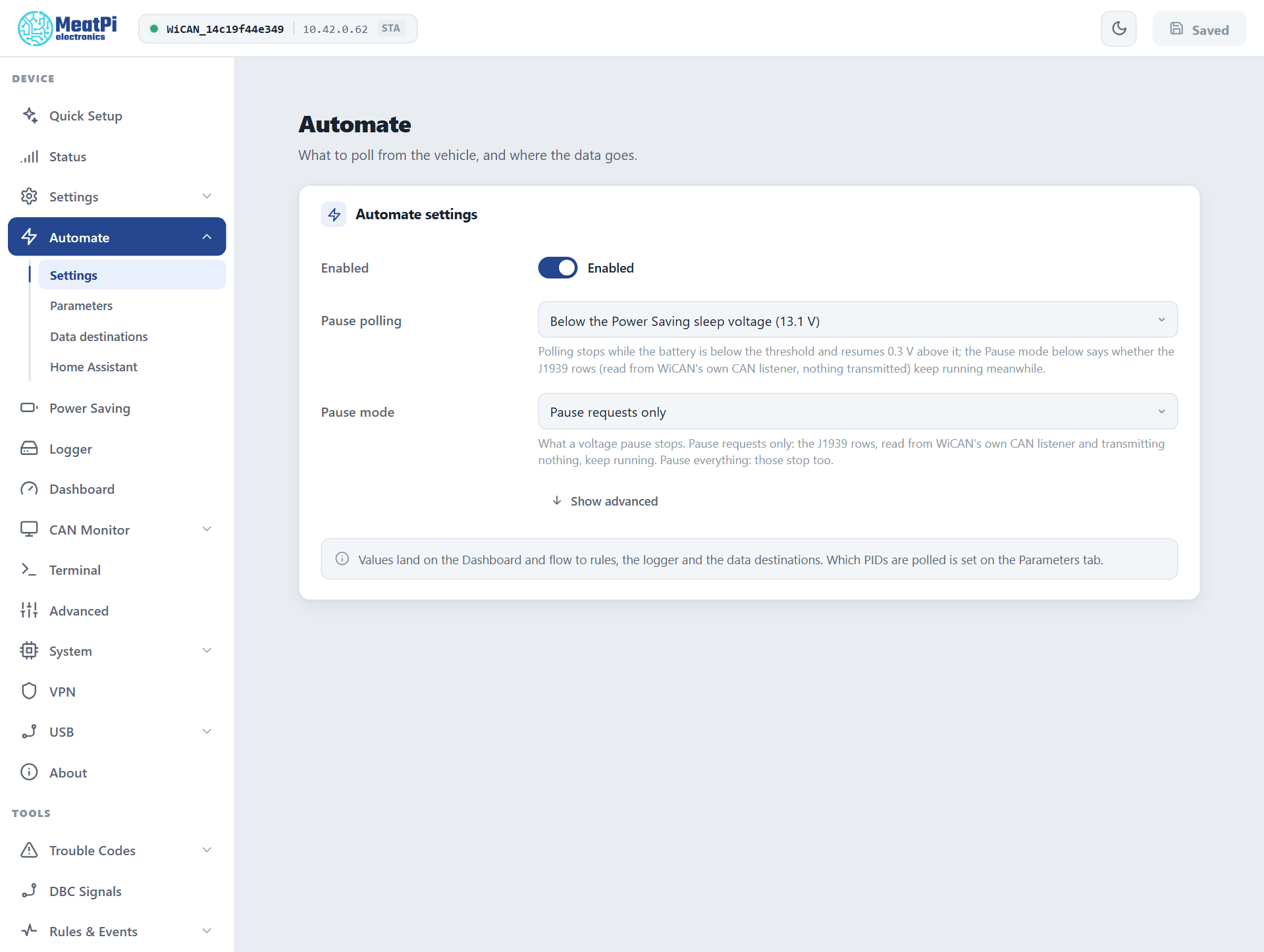
| Setting | Meaning |
|---|---|
| Enabled | The loop runs at all. Off on a new device until Quick Setup or you turn it on. |
| Pause polling | Below the Power Saving sleep voltage (the usual choice: the car's modules can sleep when the car is parked), below a voltage you choose, or never. Polling resumes 0.3 V above the threshold. |
| Pause mode | Pause requests only keeps the J1939 rows running during a pause, because they only listen and transmit nothing. Pause everything stops them too. |
| Report a change at most every (advanced) | How fast value changes are pushed to Home Assistant, MQTT and the rules. 1 second by default. |
When polling pauses, and why
The Dashboard header and GET /api/autopid say when the loop is not running and why:
| Reason | What happened |
|---|---|
| paused, voltage | the battery is below the pause voltage |
| paused, client | an app (Car Scanner, Torque, a BLE app) is talking to the OBD chip through a bridge. The loop yields and resumes 10 seconds after the app's last command. |
| paused, diagnostics | the UDS Tool, a script or a J2534 tester holds the bus |
| parked by the bus guard | the vehicle bus runs at another bit rate than the protocol in use, so nothing is sent. WiCAN listens to the bus before it lets the chip talk; a wrong bit rate would disturb the car. |
Timing
The OBD chip needs about 53 ms per request. Three parameters every second are comfortable; thirty parameters every second are not, and the Parameters page warns when a group's period is below what the chip can do. Quick Setup's Every 5 seconds is plenty for a home dashboard; Every second is for live driving data.
Where the values go
- The Dashboard: one tile per parameter, a sparkline, the age of the value.
- Home Assistant: one entity per parameter, pushed every few seconds.
- MQTT and Data destinations: the snapshot of all values, on a cycle.
- The Data logger: every value, or only changes, to the SD card.
- Automate rules:
autopid.paramevents to react to,${autopid.<name>}values to read. - Scripts and the API:
GET /api/autopid/datais the flat snapshot{"RPM": 848.5, "Speed": 0.45, ...}.
Troubleshooting
- No values at all: the ignition must be on; check Enabled on the Automate settings and the pause reason on the Dashboard header; on a new car run Scan PIDs.
- A row never answers: Test it. The transcript shows every exchange, including the init chain and the raw reply, which is the quickest way to see a wrong request or a wrong responding id.
- Values stop when an app connects: expected. The loop yields to the app and resumes 10 seconds after its last command.
- Rows exist but are switched off: WiCAN stored what the car answered when it first met it and reads nothing until you choose. Tick and Apply Configuration.
The routes behind this page are on Vehicle in the API reference.