J2534 PassThru
WiCAN PRO is a SAE J2534 PassThru device: diagnostic and reflash software on a Windows PC that expects a J2534 interface drives the car's CAN bus through WiCAN, over USB, WiFi or Bluetooth. CAN and ISO 15765 (ISO-TP) channels are supported; K-line and J1850 are not.
Switch it on
The server is off out of the box, and two safety gates stay off even when it is on:
-
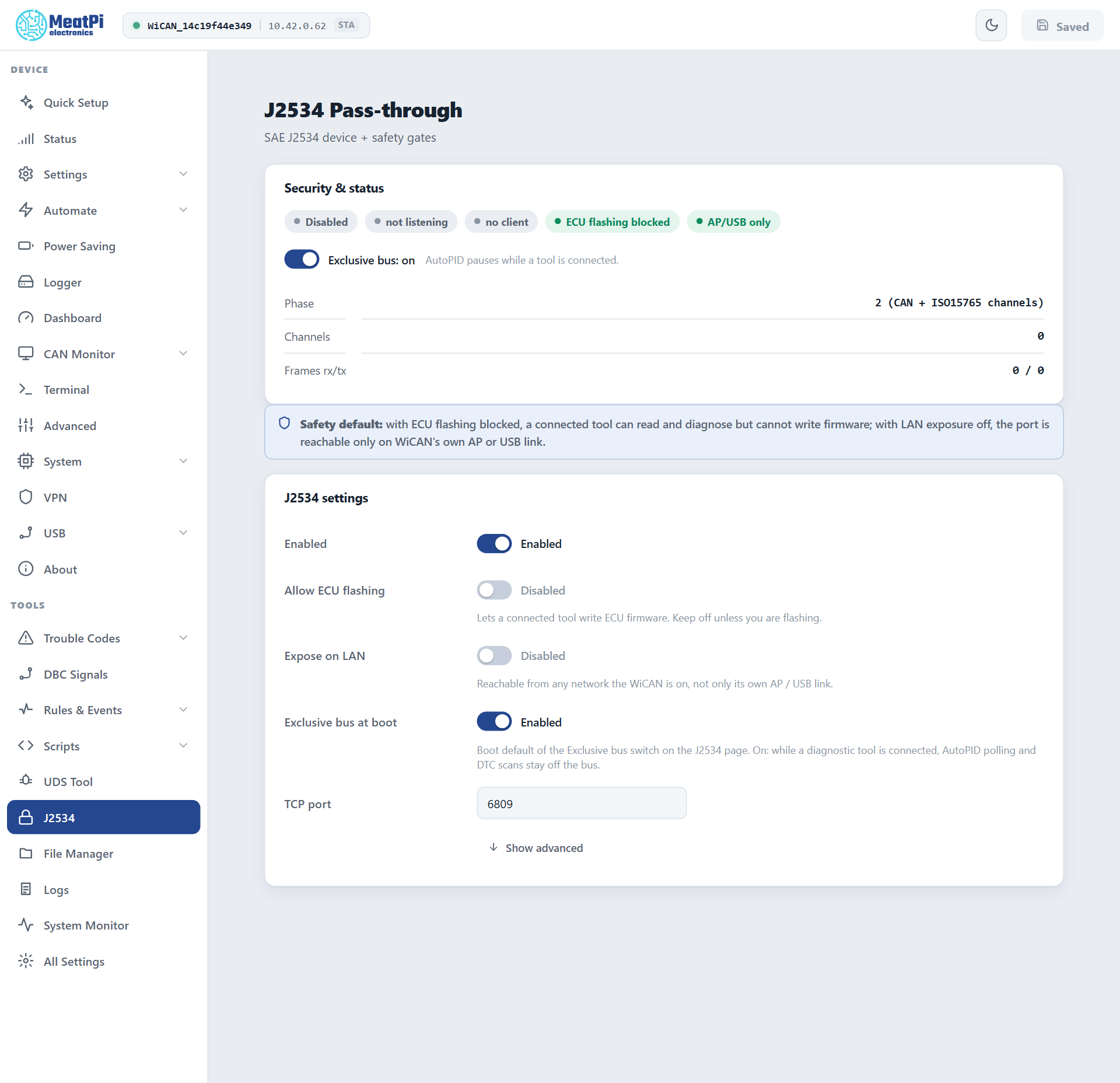
J2534 › J2534 settings › Enabled, then Submit (WiCAN restarts).
-
Leave Allow ECU flashing off unless you are about to flash. With it off a tool can read and diagnose, but the UDS services that write ECU memory (
34to37) are refused. -
Leave Expose on LAN off unless the PC has to reach WiCAN through your home network. With it off, connections are accepted only from WiCAN's own access point and the USB link: the transport has no password.
- Exclusive bus
- On by default. While a tool is connected, AutoPID polling and trouble-code scans stay off the bus so the two never talk over each other. The switch on the status card changes it for the session; Exclusive bus at boot is its default.
- TCP port
- 6809.
- One tool at a time
- Across USB, WiFi and Bluetooth. A second tool is answered
ERR_DEVICE_IN_USE.
Install the Windows driver
The installer, wican_j2534_setup_1.1.0.exe, is in the drivers/j2534 folder of the firmware repository at https://github.com/meatpiHQ/wican-fw and attached to every firmware release. It is not code-signed, so Windows SmartScreen asks before it runs.
-
Run the setup and accept the prompt.
-
Pick how the PC reaches WiCAN: the USB cable with WiCAN in network mode (recommended; WiCAN answers at
192.168.82.1on that link), the USB cable as a COM port, WiCAN's own WiFi, or a custom address for a WiCAN on your network. For WiCAN's own WiFi type its address,192.168.0.10. -
Done. The 32-bit
wican_j2534.dllgoes toC:\Program Files (x86)\WiCAN\and the device is registered for 32-bit and 64-bit tools under the nameWiCAN. The driver's manual (PDF) is installed next to it.
Run the installer again to change the address. Uninstall from Apps › Installed apps.
Connect a tool
-
The link. USB: USB › Settings › Connector role Device with the class CDC-NCM (USB accessories), then the cable to the PC. WiFi: the PC joined to WiCAN's access point, or Expose on LAN on and the PC on the same network.
-
The bit rate. The CAN bus runs at WiCAN's rate, Settings › CAN bus › Bit rate, or the rate it measured with Automatic. A tool that asks for another rate is told
ERR_INVALID_BAUDRATE. With Automatic and an ECU that stays silent until spoken to (one alone on a desk), set the rate by hand. -
In the tool, choose the J2534 device
WiCANand connect. The status card turns toclient connected, counts the open channels and the frames each way, and names the link (transport:tcp,serialorble).
Over Bluetooth
Phone apps reach the same PassThru server over Bluetooth LE. The J2534 channel is only advertised while the server is enabled; the app pairs like any other (Bluetooth LE) and runs one session per link, the same single-tool rule applying. The wire protocol every transport speaks is documented for app developers in the firmware repository (components/j2534_server/J2534_WIRE_PROTOCOL.md); the Bluetooth binding is in the BLE API.
Flashing an ECU
Switch Allow ECU flashing on for the job and off again afterwards. Give the session every chance: WiCAN powered from the car with the battery charged or on a maintainer, the PC on USB rather than WiFi, nothing else talking to the car (Exclusive bus on). A reflash interrupted halfway is the tool's problem to recover, not WiCAN's.
Status
GET /api/j2534 carries the same facts as the page (Vehicle): enabled, listening, a client connected, the transport, channels, frames, the gates and whether AutoPID is paused. POST /api/j2534 {"exclusive": false} flips the runtime switch.
Troubleshooting
| Symptom | Likely cause | What to do |
|---|---|---|
| The tool does not find WiCAN | the server is off, the wrong address in the driver, or the PC comes in over the LAN with the gate closed | Enabled and Submit; re-run the installer with the right address; Expose on LAN |
ERR_DEVICE_IN_USE |
another session holds the device (a phone over Bluetooth, an earlier tool) | close it |
ERR_INVALID_BAUDRATE |
the tool asked for a rate other than WiCAN's | set Bit rate to the vehicle's rate |
| Channel opens, every write fails | Automatic and nothing on the bus to measure | set the rate by hand |
| Flashing is refused | Allow ECU flashing is off | switch it on for the job |
| Dashboard values freeze during a session | Exclusive bus is on, as intended | they resume when the tool disconnects |