Data logger
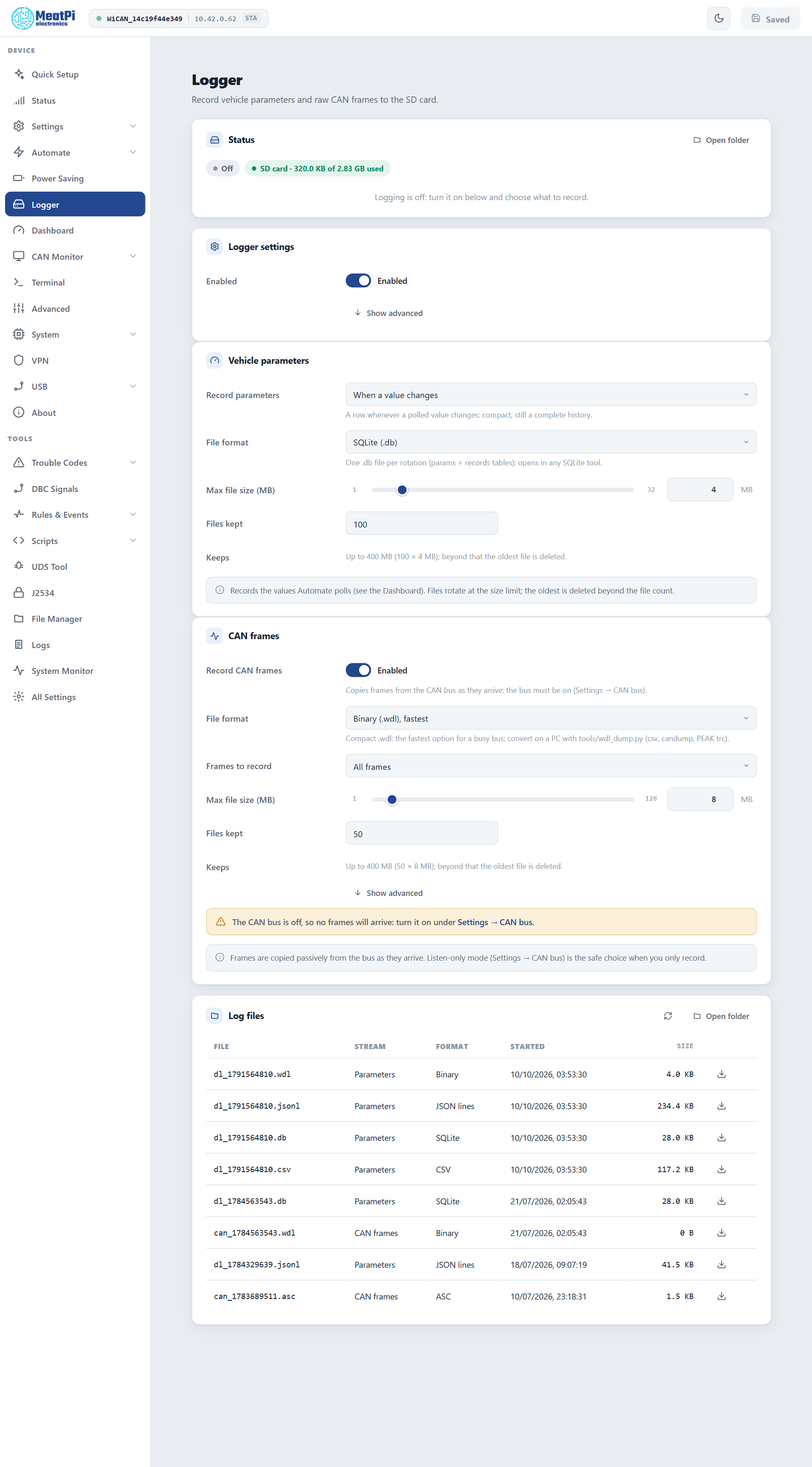
WiCAN PRO records to the SD card: the vehicle parameters it polls, and raw CAN frames, each in the file format your tools open. SQLite, CSV and JSON lines for the parameters; for frames also MDF4, Vector BLF, candump and ASC. Files rotate by size, the oldest go when the count is reached, and the Dashboard reads its history from them.
Before you start
An SD card in the slot, formatted FAT (as cards come). The Logger page's status chip reads SD card · used of total once the card is mounted. WiCAN never formats a card: an unreadable one stays unmounted and the chip says so. Files land in /sd/logs.
Vehicle parameters
The values AutoPID polls, as they arrive. A parameter is stored as autopid.<name>.
- Record parameters
- Off, When a value changes (a row whenever a polled value differs from the last one: compact, still a complete history) or Every poll.
- File format
- SQLite (.db), the default: one file per rotation with
paramsandrecordstables, opens in any SQLite tool. CSV (.csv):ts_ms,source.name,value. JSON lines (.jsonl): one object per line. Binary (.wdl): the compact format, converted on a PC. - Max file size, Files kept
- 1 to 32 MB (4) and 1 to 500 files (100): the page works out what the card keeps at most.
To record only some parameters, or any value an event carries, leave Record parameters off and use a rule: autopid.param matching the parameter, action Logger write (Automate rules).
CAN frames
Every frame on the bus, or those matching an id, copied as they arrive. The CAN interface must be on (Settings › CAN bus) at the bus's bit rate or Automatic; Listen-only is the right choice when you only record.
- Record CAN frames
- The switch of the stream.
- File format
- Binary (.wdl), the default and the fastest: the one for a busy bus. MDF4 (.mf4) (ASAM, for asammdf, CANoe, MATLAB), BLF (.blf) (Vector), candump (.log) (SocketCAN text, for can-utils replay and SavvyCAN), ASC (.asc) (CANalyzer text), CSV (
ts_ms,id,ext,rtr,dlc,data), JSON lines, SQLite (slow: only for a filtered or quiet bus). - Frames to record
- All frames, or the ids matching a filter and mask, 11 or 29 bit; the page spells out the id range that matches.
- Max file size, Files kept
- 1 to 128 MB (8) and 1 to 500 files (50).
MDF4, BLF and ASC files start fresh at every restart and rotation; they are never appended across boots. A .wdl file is converted with tools/wdl_dump.py from the firmware repository: --to csv, candump, trc (PEAK) or text.
The files
| Name | Stream |
|---|---|
dl_<time>.<ext> |
parameters |
can_<time>.<ext> |
CAN frames |
<time> is the start time in seconds since 1970, so names sort by age. A file is closed at its size limit and a new one starts; beyond the file count the oldest of that stream is deleted. The list at the bottom of the Logger page shows the newest files with a download button; Open folder goes to the File Manager at /sd/logs.
The file being written is locked
Downloading or deleting the active file of a stream fails with file in use, on purpose: a file removed while it is written leaves orphaned clusters on the card. Press Pause on the page (both streams close their files) or wait for the rotation, then download. Rotated files are always free.
Pause, and rules
- Pause on the Logger page stops both streams until Resume or the next restart; the settings stay. Records keep queueing while paused, so a resume also lands the newest ones from just before.
- A rule can do the same with the actions Logger enable and Logger disable: log only while driving, start on a trouble code, stop below a battery voltage.
- The events
logger.rotated(with the file name) andlogger.errorcan trigger a rule too: upload a file when it rotates, say.
The Dashboard reads the files
A chart tile on the Dashboard backfills its parameter's history from the recorded files (windows of 15 minutes to 6 hours) and continues live, in any of the four parameter formats. With the logger off, or Record parameters off, the tile says so and links here.
Power cuts and crashes
Records are gathered in memory and written in batches every 5 seconds (Show advanced: the flush interval, the batch size and the queue length). A power cut loses the last few seconds at most; SQLite commits are atomic, text and binary files get a torn tail trimmed when logging resumes. A file WiCAN cannot read back is set aside as <name>.corrupt with a fault on the Status page, and logging goes on in a fresh file. Planned restarts and sleep close the files first.
Timestamps
Every row carries the time it was taken, in UTC, as milliseconds since 1970 (the ts or ts_ms column; the (sec.usec) stamp of candump). WiCAN keeps its clock in UTC everywhere: the battery-backed clock chip restores it seconds after power-on, an internet time sync corrects it whenever a network comes up, and Settings › Clock can set it by hand. Your tools convert to local time; nothing on the device does.
The clock can still move while WiCAN records: the first sync after a long time unpowered moves it from 1970 to today, a sync after weeks without one corrects the chip's drift by seconds, a manual set moves it by whatever you typed. What happens to the rows:
- A row queued just before a correction is written with the corrected time.
- MDF4, BLF and ASC files measure their time from the moment the file started and never run backwards; MDF4 and BLF carry the corrected start in their header.
- When the clock becomes valid, or moves by a minute or more, both streams close their files and start new ones: a file is consistent within a minute from end to end.
- The device writes down what its clock did in
/sd/logs/clock.jsonl, the clock journal: one line when a boot starts (whether the clock was set), one for every time it was set (how far it moved, which files were open), one for every file closed because of it. Clock journal on the Logger page downloads it. JSON lines, CSV, binary and SQLite files also carry a marker where the clock moved inside them.
The Logger page's status says how the clock was set and whether it moved this boot; the file list says clock not set until ... for a file written before the first sync, or clock moved +2 h for one the clock moved under. The Dashboard reads the journal and places history points at their corrected times.
A file recorded before a correction can be re-based on a PC with the journal and tools/log_clock.py from the firmware repository: python log_clock.py --journal clock.jsonl --rebase dl_1791890598.wdl writes dl_1791890598.rebased.wdl with every row moved by the corrections that came after it (JSON lines, CSV, candump and binary files); --show clock.jsonl prints the journal as a table. Rows written on a WiCAN that never gets a time sync stay at 1970 plus the time since boot; the journal's boot lines tell them apart per boot.
Troubleshooting
| Symptom | Likely cause | What to do |
|---|---|---|
Waiting for storage |
no card, or a card WiCAN cannot read | seat the card; format it FAT on a PC |
| Recording, but no parameter rows | Record parameters off, polling off or paused, ignition off | When a value changes; Automate › Settings; ignition on |
| An empty CAN file | the CAN interface is off or at the wrong bit rate | Settings › CAN bus › Enabled, Automatic |
Download answers file in use |
the active file | Pause, download, Resume |
dropped or frames_dropped grows |
the card cannot keep up with the rate | Binary (.wdl) for frames, a filter, a faster card |
Timestamps in 1970, clock not set in the file list |
the clock was not set when the file started (no network, the clock chip's backup drained) | a time source (WiFi, or set the clock by hand under Settings › Clock); re-base the file with the clock journal and tools/log_clock.py |
Rows jump by hours inside one file, or the file list says clock moved |
the clock was corrected while the file was open | the rows after the marker are right; re-base the ones before with the clock journal |