UDS Tool
Send a diagnostic request (ISO 14229, UDS) to an ECU by hand and read the answer decoded: read a data identifier, open a session, keep it alive, list trouble codes. The tool goes over WiCAN's own CAN interface with ISO-TP, or through the OBD chip when that is the only path, and keeps WiCAN's own polling off the bus while you work.
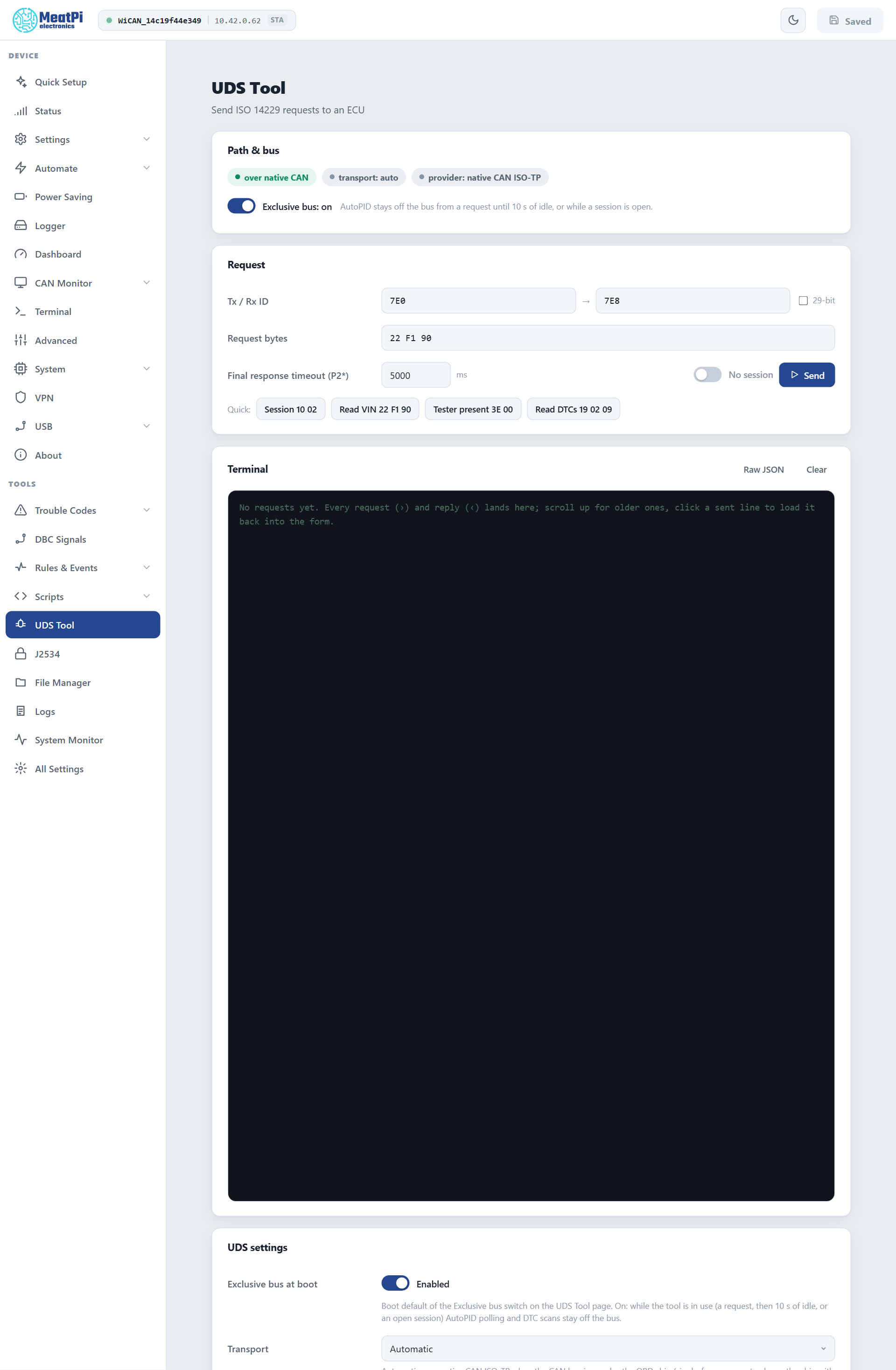
Path and bus
The first card says which path a request takes: over native CAN (the CAN interface with WiCAN's own ISO-TP) or over the OBD chip, the transport setting and the provider. Transport Automatic uses the native path when the CAN interface runs in normal mode (Settings › CAN bus), and the chip otherwise. The native path is the better one: faster, any id, long answers; the chip covers the standard 11-bit ids 7E0 to 7E7 (answers on 7E8 to 7EF) and the 29-bit 18DAxxF1 form.
Exclusive bus (on by default): from a request until 10 seconds of quiet, and for as long as a session is open, AutoPID polling and trouble-code scans stay off the bus, so the answer you get is to your request. The Dashboard's values pause meanwhile.
Send a request
- Tx / Rx ID
- The id WiCAN sends on and the id the ECU answers on:
7E0and7E8for the engine ECU of most cars. Tick 29-bit for extended ids. - Request bytes
- The service and its data, hex, spaces optional:
22 F1 90reads the VIN,10 03opens the extended session,19 02 09lists confirmed trouble codes. - Final response timeout (P2*)
- How long to wait after the ECU says
7F xx 78(response pending): 5 s by default. The first answer itself is expected within P2 (250 ms). - Session
- Off: one request, one answer. On: WiCAN keeps the ECU's session open with a tester-present message every 2 s and holds the bus, so a conversation (session, security access, reads, writes) stays on one ECU.
The quick buttons send the usual first steps: Session 10 02, Read VIN 22 F1 90, Tester present 3E 00, Read DTCs 19 02 09.
The terminal
Every request (›) and reply (‹) lands in the terminal, newest at the bottom: a positive answer with its bytes, or the negative response code with its ISO name (conditionsNotCorrect, securityAccessDenied ...), the response-pending frames counted, the time it took and the path used. A VIN or another text identifier is shown as text as well. Click a sent line to load it back into the form; Raw JSON shows the firmware's answer as it came; Clear empties the terminal, which the browser otherwise keeps across visits.
Settings
- Exclusive bus at boot
- The default of the switch above.
- Transport
- Automatic, OBD chip or native CAN ISO-TP.
- P2, P2*, tester present
- 250 ms, 5000 ms and 2000 ms by default.
Changes apply from Submit (WiCAN restarts); the exclusive switch also applies at once.
From rules and scripts
A rule can send a request with the UDS request action and react to its outcome with the uds.response trigger (the answer truncated to a few bytes). A script gets the whole answer with uds() and can hold a session across several requests, which is the way to do security access or a flash.
Limits
- One transaction at a time: a second request, or a request while another tool holds the bus, is answered
busy. - WiCAN refuses to send on a bus that runs at another bit rate than the protocol in use (the bus guard): a live 250 kbit/s bus gets no 500 kbit/s request.
- A request is at most 64 bytes; an answer up to 4 KB over the native path.
Troubleshooting
| Symptom | Likely cause | What to do |
|---|---|---|
| Timeout, no answer | ignition off, wrong ids, or the ECU does not answer that service | ignition on; 7E0 and 7E8 first; try 3E 00 |
serviceNotSupported (11) or subFunctionNotSupported (12) |
the ECU has no such service or sub-function | the vehicle's documentation |
conditionsNotCorrect (22) or securityAccessDenied (33) |
the request needs a session or security access first | Session on, 10 03, then the request |
busy |
another request, an open session, a running scan or script | wait, or end the session |
Bus runs at another bit rate |
the CAN interface is pinned to the wrong rate | Settings › CAN bus › Automatic |
| Values on the Dashboard stop | Exclusive bus is on, as intended | they resume 10 s after the last request |