J1939 and WWH-OBD
Trucks, buses, agricultural and construction machines do not talk like a car. Their controllers broadcast what they know on the CAN bus (SAE J1939), and their legislated emission data is asked over UDS (WWH-OBD, ISO 27145). WiCAN PRO listens to the first and asks the second; a European truck has both on one bus, and WiCAN handles both at once.
Which is which
| OBD-II (a car) | WWH-OBD, OBD on UDS | SAE J1939 | |
|---|---|---|---|
| Who | Passenger cars and light vehicles | EU heavy-duty vehicles and vans (ISO 27145); US cars from model year 2027 (SAE J1979-2) | Trucks, buses, agricultural and construction machines |
| How the data moves | WiCAN asks, the ECU answers (010C for engine speed) |
WiCAN asks over UDS (22F40C for the same value) |
The controllers broadcast on their own; nobody has to ask |
| What WiCAN uses | The OBD chip | The OBD chip | Its own CAN interface, listening |
| Set up by | Quick Setup's vehicle step, or Scan PIDs | The same: WiCAN finds that 22F400 answers where 0100 is silent |
Quick Setup's vehicle step hears the network, or Settings › CAN bus by hand |
J1939: listening to the network
Switch the listener on
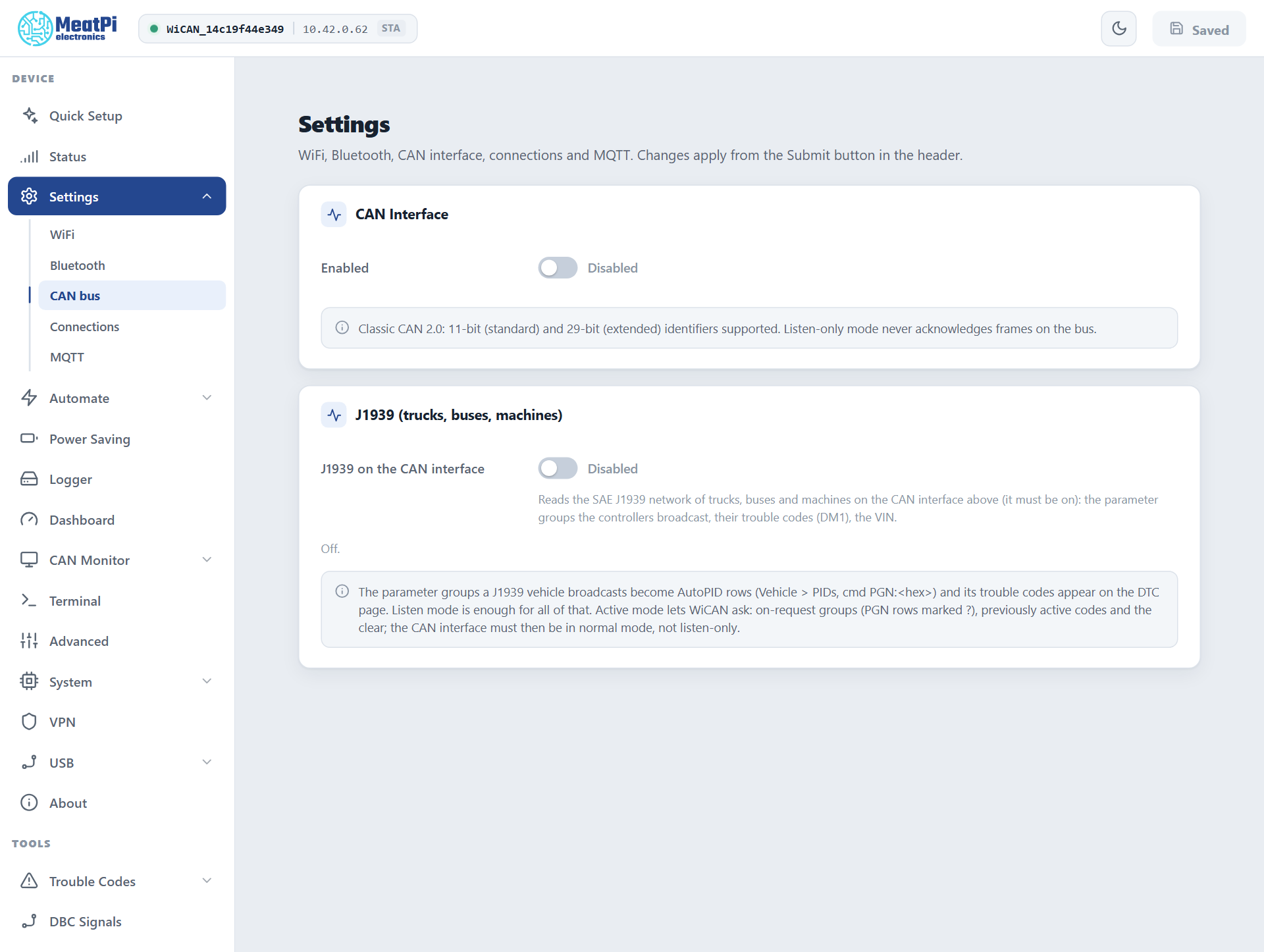
Quick Setup does this for you: its vehicle step listens to the network when no OBD answer comes, reports J1939 vehicle with the bit rate it measured, and stages the CAN interface and the listener in the one restart it asks for. By hand:
-
Settings › CAN bus › CAN Interface › Enabled
Bit rate Automatic lets WiCAN measure the bus (most J1939 networks run at 250 kbit/s, some at 500). Keep Listen-only (silent) mode on: WiCAN never acknowledges or sends a frame on the vehicle's network.
-
J1939 (trucks, buses, machines) › J1939 on the CAN interface
-
Submit in the header. WiCAN restarts and starts listening.
What it hears
- Parameter groups (PGNs): the newest message of every group from every controller, long messages reassembled. Groups a controller only sends on request appear when some other node of the vehicle asks for them (an instrument cluster usually does).
- The VIN, when a controller broadcasts it (PGN 65260).
- Active trouble codes (DM1) of every controller, with the four lamps.
- Who is on the bus: each source address, its frame count and, when it claimed its address, its NAME.
The status is GET /api/j1939 (Vehicle): the state (off, no_bus when the CAN interface is off, listening), the bus verdict (j1939 once two well-known groups were seen, other after 50 frames without one), sources, values and DM1. The Parameters page shows a listener line over the table with the same facts.
Values on the Dashboard: PGN rows
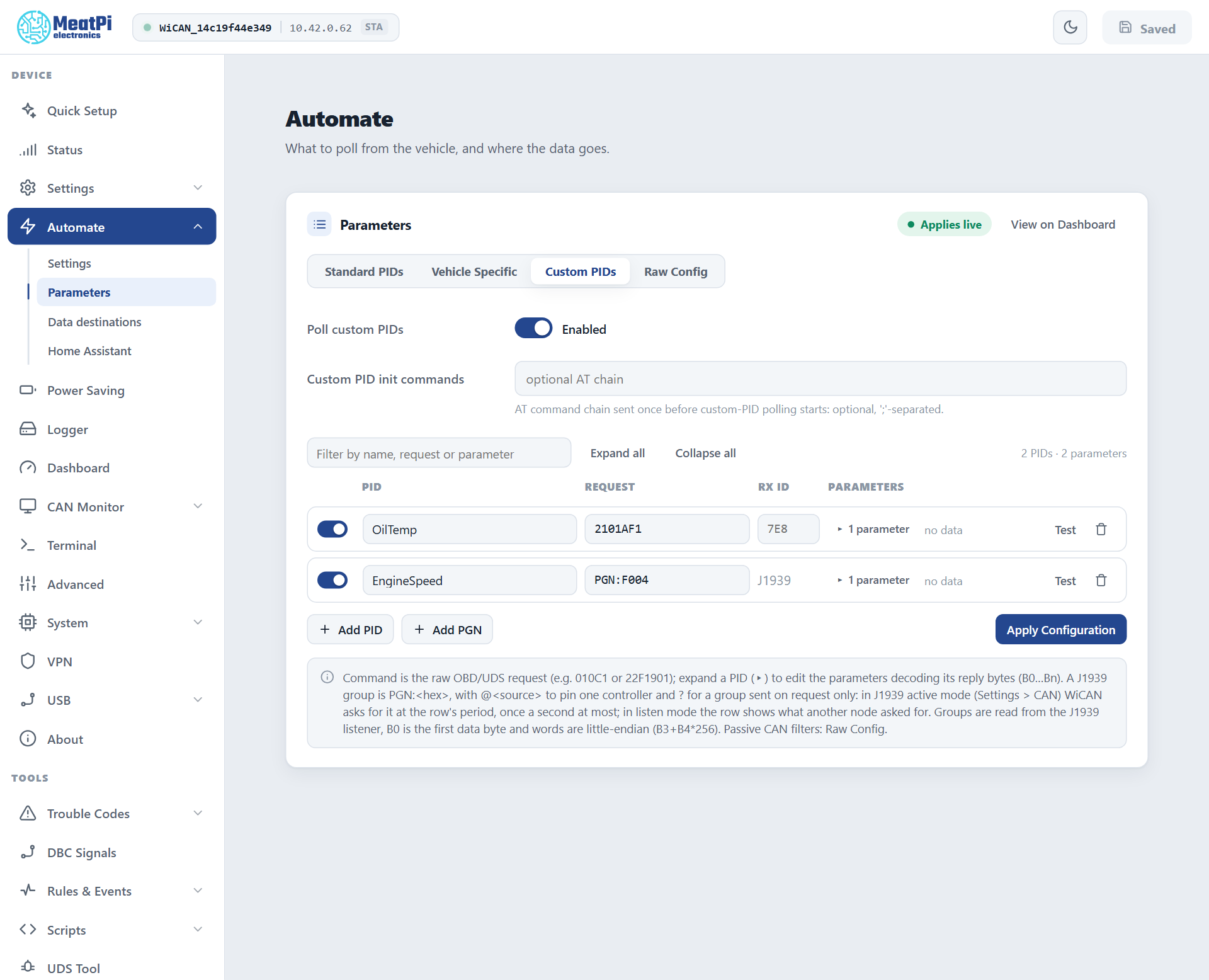
A J1939 value is an ordinary parameter row whose request names a group instead of a PID. Automate › Parameters › Custom PIDs › Add PGN adds one (PGN:F004, engine speed); the row shows a J1939 tag where an RX ID would be, and Test decodes it from what the listener holds.
PGN:F004          engine controller 1, from whichever controller sends it
PGN:FEEE@0        engine temperature from source address 0 (the engine)
PGN:FEE5?         engine hours: a group only sent on request
- PGN:<hex>
- The group number, 1 to 5 hex digits.
- @<source>
- Pins one controller (0 to 253). Without it WiCAN takes the lowest address heard in the last 5 seconds, so the engine wins over a trailer.
- ?
- A group sent on request only. In listen mode the row shows what another node asked for; in active mode (below) WiCAN asks at the row's period, once a second at most.
- Expressions
B0is the first data byte. J1939 words are little-endian, so compose them byte by byte:B3+B4*256, not[B3:B4].
WiCAN knows 21 common values by name, so a row for one of these needs no expression of its own and Quick Setup offers them as the standard set of a J1939 vehicle:
| Name | SPN | Group | Unit |
|---|---|---|---|
| EngineSpeed, ActualEnginePercentTorque | 190, 513 | F004 | rpm, % |
| AccelPedalPosition1, EnginePercentLoad | 91, 92 | F003 | % |
| TransCurrentGear | 523 | F005 | |
| WheelBasedVehicleSpeed | 84 | FEF1 | km/h |
| EngineCoolantTemperature, EngineOilTemperature | 110, 175 | FEEE | degC |
| EngineOilPressure | 100 | FEEF | kPa |
| IntakeManifoldPressure, IntakeManifoldTemperature | 102, 105 | FEF6 | kPa, degC |
| BarometricPressure, AmbientAirTemperature | 108, 171 | FEF5 | kPa, degC |
| BatteryPotential | 168 | FEF7 | V |
| FuelRate | 183 | FEF2 | L/h |
| FuelLevel1 | 96 | FEFC | % |
| DEFTankLevel | 1761 | FE56 | % |
| TotalVehicleDistanceHR | 917 | FEC1 | km |
| TotalVehicleDistance | 245 | FEE0 (on request) | km |
| EngineTotalHours | 247 | FEE5 (on request) | hours |
| EngineTotalFuelUsed | 250 | FEE9 (on request) | L |
Everything else comes from a DBC file (DBC Signals) or a PGN row with your own expression.
Not available is not a value
J1939 reserves the top of every range: FF means the controller has no such parameter, FE that it cannot measure it right now, FB a special meaning (a gear selector in park). WiCAN reports those states and publishes no value for them, so a dashboard never shows 255 degrees.
Trouble codes on a J1939 vehicle
Trouble Codes shows the active codes every controller broadcasts (DM1): SPN110-0 form, the occurrence count, the source address in the ECU column, and the four lamps (MIL, Stop, Warning, Protect) as chips. A listener clears nothing, so the page offers no clear on a J1939-only vehicle. See Trouble codes.
Active mode: when WiCAN must ask
Listening covers nearly everything. Active mode makes WiCAN a node of the network: it claims an address (249 by default, the first off-board diagnostic tool address, moving to another one when a controller contests it), answers requests addressed to it, and can ask:
- the groups sent on request (
?rows: engine hours, total distance, fuel used) at the row's period; - the VIN during vehicle detection;
- previously active codes (DM2) for the Trouble Codes report, and the clears (DM11, DM3) when clearing is allowed.
Under Settings › CAN bus › J1939 › Show advanced: Mode Active and the Preferred address. The CAN interface must then run in normal mode (Listen-only off), because a node has to acknowledge frames. Use it when a value you need is only sent on request; on a vehicle you merely want to watch, stay in listen mode.
WWH-OBD and OBD on UDS
Nothing to set. Vehicle detection asks 0100 and 22F400; the one that answers decides the dialect, and WiCAN remembers it with the car. From then on:
- Standard PIDs are
22F4xxrequests. Each row carries the ECU that owns the value (22F40C · ECU 58on the Parameters page), because the same PID can come from several ECUs on such a vehicle. - The VIN is read with
22F802(or22F190). - Trouble Codes shows the path
OBD on UDS (ISO 27145): confirmed and pending codes, permanent codes, every ECU parsed apart. The legislated clear wipes the emission codes of every ECU, like mode 04 on a car. - Profiles work as on any car; standard and vehicle-specific rows can mix.
An EU truck answers WWH-OBD and broadcasts J1939 on the same bus: its record carries the UDS dialect and the J1939 flag, its table holds 22F4xx rows beside PGN: rows, and its DTC report lists the UDS codes with the DM1 codes. Quick Setup adds a J1939 network as well note when it finds one.
Troubleshooting
| Symptom | Likely cause | What to do |
|---|---|---|
State no_bus |
the CAN interface is off | Settings › CAN bus › Enabled, Submit |
Bus verdict other |
not a J1939 network, or the wrong bit rate | Bit rate Automatic; check the connector carries the J1939 bus (some vehicles have it on other pins than the diagnostic CAN) |
| No sources, no values | the network is quiet: ignition off | ignition on; many controllers only broadcast with the engine running |
A ? row never updates |
listen mode, and nobody else asks for that group | active mode, or drop the row |
| Values freeze for a while and resume | the controller stopped broadcasting; WiCAN keeps the last value and marks its age | nothing |
queue_drops grows in the status |
the bus is busier than the listener's queue in bursts | normal on a loaded bus; the stored messages are still the newest |