Data destinations
A destination is a place the live parameter set is sent to on a cycle: an MQTT topic, an HTTP or HTTPS endpoint (your own server, a cloud ingest), or ABRP, A Better Routeplanner, for EV route planning. Up to 8 of them, each with its own interval and switch, on ==Automate== › ==Data destinations==.
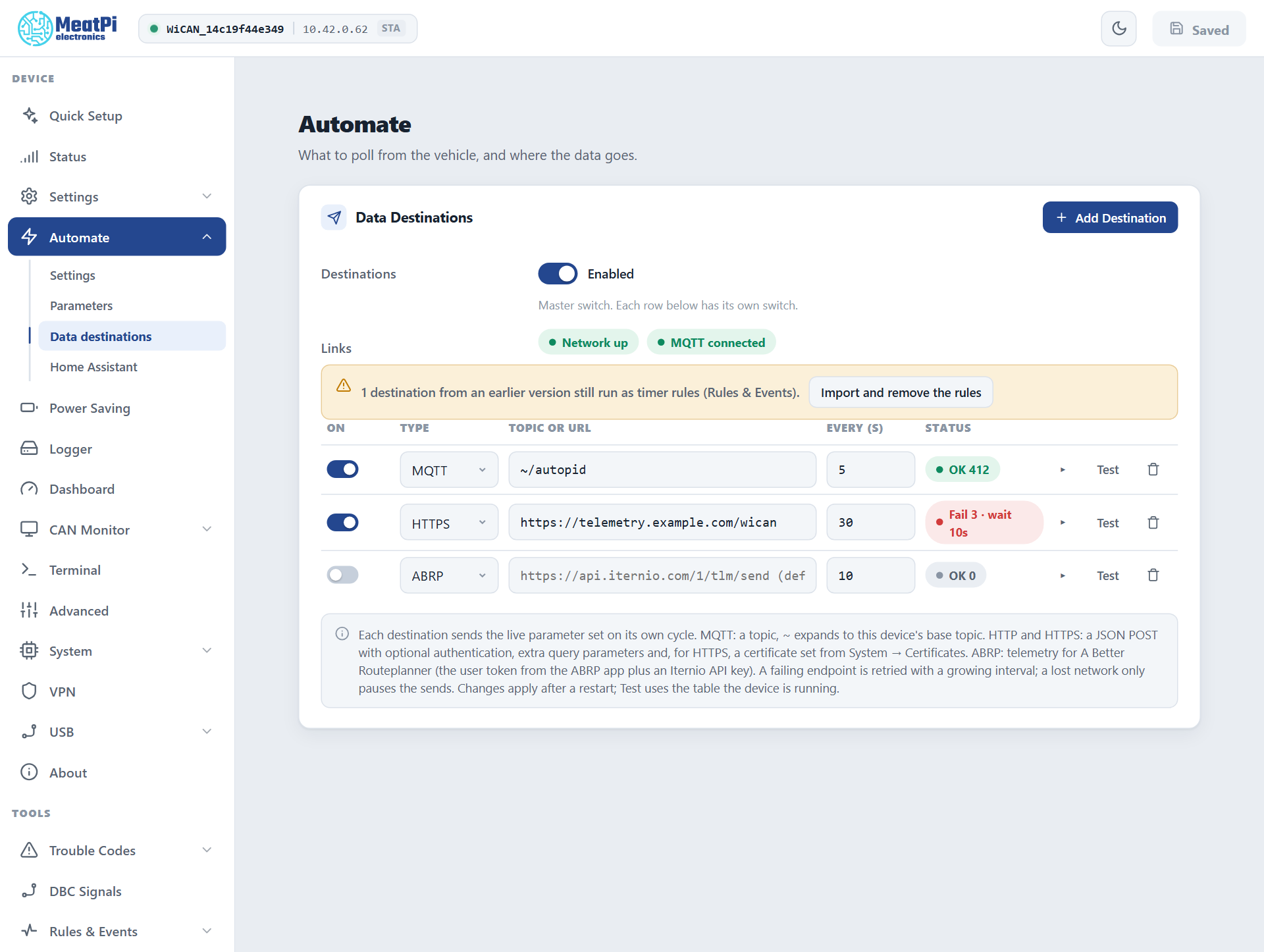
The page
- Destinations is the master switch; each row has its own.
- Links shows whether the network is up and the MQTT session connected. An MQTT row needs the second, HTTP, HTTPS and ABRP rows the first.
- A row: on or off, the type, the topic or URL, the interval in seconds, and a status chip:
OK n(deliveries),Fail n · wait Ns(failing, with the current back-off). The caret opens the row's options and its counters; Test delivers once, right now, with the table the device is running; the bin removes the row. - Add Destination adds a row. Rows apply from Submit in the header (WiCAN restarts).
A device set up before the destinations table existed may show a banner about destinations that still run as timer rules; Import and remove the rules moves them here.
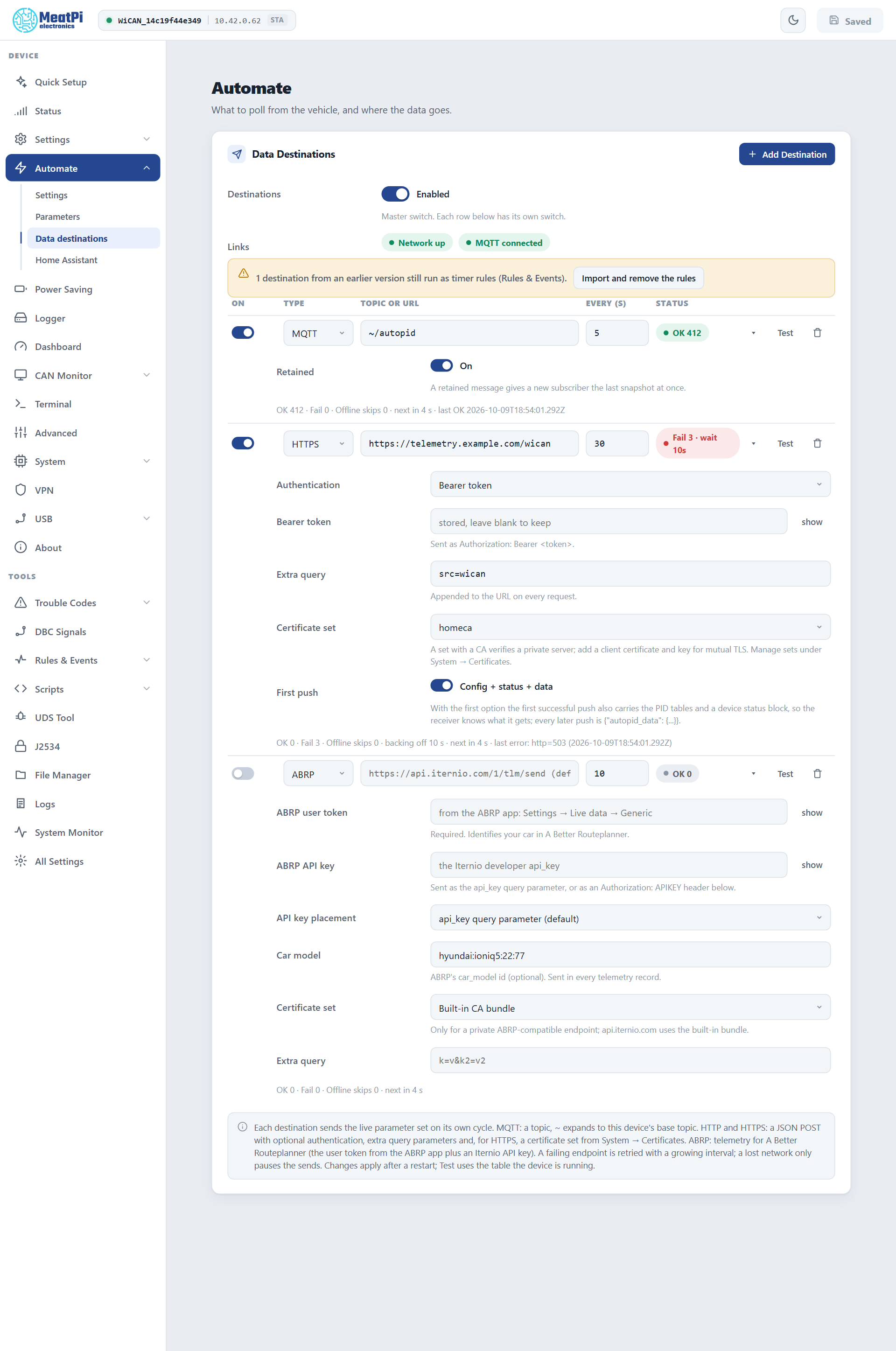
MQTT
Needs MQTT configured under Settings › MQTT. The topic defaults to ~/autopid (~ is the device's topic prefix, wican/<device id>); Retained (on by default) gives a new subscriber the last snapshot at once. The payload is flat, one key per parameter, plus the time:
This row is what Quick Setup's MQTT broker use case creates. The bench device has carried it since: OK 708 deliveries, 0 failures, and 61 laps skipped while the network was away.
HTTP and HTTPS
A JSON POST to your URL on every cycle. A bare host gets the scheme of the type; an https row refuses an http:// URL.
- Authentication
- None, a bearer token (
Authorization: Bearer ...), an API key in a header (namex-api-keyby default) or in the query string (api_keyby default), or basic authentication with a username and password. Tokens and passwords are write-only once saved. - Extra query
k=v&k2=v2, appended to the URL on every request.- Certificate set
- HTTPS only. Blank verifies the server against the built-in bundle (public certificates). A set from System › Certificates with your CA verifies a private server; a client certificate and key in the set give mutual TLS. A server addressed by IP skips the name check.
- First push
- On by default: the first successful push also carries
config(the PID tables) andstatus(device id, firmware, uptime, battery voltage, link state), so the receiver knows what it is getting. Every later push is the short form.
What the bench device sent to a receiver on the bench Pi, with a bearer token and the extra query src=wican. The request line and headers:
POST /wican?src=wican
User-Agent: WiCAN/6
Content-Type: application/json
Authorization: Bearer doc-check-token
The short form, every cycle:
The first push with First push on (the config object is the PID table, shortened here):
{
  "config": {
    "groups": [{"name": "default", "enabled_default": true, "period_ms": 5000}],
    "pids": [{"name": "EngineCoolantTemp", "type": "std", "cmd": "0105", "group": "default",
              "parameters": [{"name": "EngineCoolantTemp", "expression": "B2-40", "unit": "degC", "class": "temperature", "min": -40, "max": 215}]}],
    "filters": []
  },
  "status": {
    "device_id": "68ee8f5a653d", "fw_version": "v6.00p_alfa-02", "hw_version": "WiCAN-PRO", "device_type": "wican_pro",
    "uptime": "00:00:08", "network_connected": true, "mqtt_connected": true, "ecu_status": "offline",
    "batt_voltage": 13.45, "timestamp": 1791570957
  },
  "autopid_data": {"EngineCoolantTemp": 90, "EngineRPM": 800, "VehicleSpeed": 0, "timestamp": 1791570957}
}
The first push goes out seconds after the restart, so its ecu_status can still read offline while the values are already there.
ABRP (A Better Routeplanner)
Live telemetry for an EV's route planning. Leave the URL empty for Iternio's endpoint.
- ABRP user token
- From the ABRP app: open the vehicle's live data setup and choose Generic; the token it shows identifies that vehicle. Required.
- ABRP API key
- Your own Telemetry API key from Iternio (free for telemetry: write to contact@iternio.com). It identifies the application and allows 2 requests per second. Sent as the
api_keyquery parameter by default, or as anAuthorization: APIKEYheader (API key placement). - Car model
- ABRP's
car_modelid, optional, sent with every record. - Every
- 5 seconds at least: Iternio asks for a point every 5 seconds and discourages 30 or more. A shorter value runs at 5. WiCAN also starts ABRP requests at least 2.5 seconds apart, the Test button included, so no table or click pattern can pass Iternio's limit.
- ABRP fields
- What this vehicle provides to ABRP right now, and for each missing planning field the parameter name that would fill it (
socfromSOC,powerfromHV_W,is_chargingfromCHARGING). A row that reads "Missing for route planning: soc" sends a position ABRP can show but nothing it can plan with.
Wrong token or key
Iternio refuses a missing or wrong user token with abrp: error "Unauthorized Token" and a wrong key with abrp: error "Unauthorized Key"; the row's last error shows which one.
WiCAN maps the vehicle's parameters onto ABRP's fields by name, case-insensitive, values passed through unchanged. The vehicle profile therefore has to produce ABRP's units: power in kW with charging negative, current in A, odometer and est_battery_range in km, tyre pressure in kPa. is_charging, is_dcfc and is_parked become 0 or 1 from a boolean or an on/off value.
| Parameter name in WiCAN | ABRP field |
|---|---|
SOC |
soc |
HV_W |
power |
SPEED |
speed (the GPS speed when the vehicle has none) |
CHARGING, CHARGING_DC, PARK_BRAKE |
is_charging, is_dcfc, is_parked |
HV_CAPACITY_KWH, HV_CAPACITY_R, SOH |
capacity, soe, soh |
TMP_A, BATT_TEMP, T_CAB |
ext_temp, batt_temp, cabin_temp |
HV_V, HV_A |
voltage, current |
ODOMETER, RANGE |
odometer, est_battery_range |
TYRE_P_xx |
tire_pressure_xx |
gps_latitude, gps_longitude, gps_altitude, gps_heading (from an ESPNetLink or a USB receiver) |
lat, lon, elevation, heading |
Iternio answers {"status":"ok"}; anything else is counted as a failure even on HTTP 200, and the row's last error shows the reason (abrp: error ["missing utc"] ...).
How deliveries behave
- No link, no failure. While the network is down (or the broker is disconnected, for an MQTT row) the lap is skipped and counted as
Offline skips; the next lap after the link returns delivers. The log gets one line per outage, not one per lap, so a car out of WiFi range does not fill it. - A failing endpoint backs off. A transport error, a non-2xx reply or an ABRP
statusother thanokcounts as a failure. From the third failure in a row the interval doubles from 10 s up to 8 times the row's period (at least 60 s, never above 10 minutes); the first success resets it. The chip readsFail 3 · wait 10smeanwhile. - One poster, in order. Rows are delivered one after the other each second. A slow or failing HTTPS row delays the rows after it by its request time (up to 6 s): keep an ABRP row's neighbours healthy, or give ABRP a table of its own.
- Test runs one delivery at once, ignoring the cycle and the back-off, and books it in the counters.
Conditions, templates and event-driven posts are not here: they live in Rules & Events, where a timer or an event can publish to MQTT or post to a URL with a body you compose (Automate rules).
Troubleshooting
| Symptom | Likely cause | What to do |
|---|---|---|
Fail with http=401 or 403 |
wrong or missing authentication | the token, key or basic credentials; the header or query name the server expects |
Fail with http=404 or 5xx |
the URL, or the server | check the URL in a browser; the server's log |
no network - waiting in the log |
the link is down | nothing: deliveries resume with the link |
| An MQTT row never delivers | the broker is not connected | Settings › MQTT; the MQTT connected chip |
| HTTPS fails on a private server | its certificate is not trusted | a certificate set with the CA, or the IP address instead of the host name |
| ABRP shows nothing | the user token, or the parameter names and units | the token from the app; a profile with ABRP's names; the row's last error |