Automate rules
A rule is "when this happens, do that", running on the device itself: when the battery drops, publish an alert; while the car is at home, poll slowly; when a new trouble code appears, turn the LED red. Triggers are events the device raises, actions are things its components can do, and a rule can undo its action when the condition stops holding.
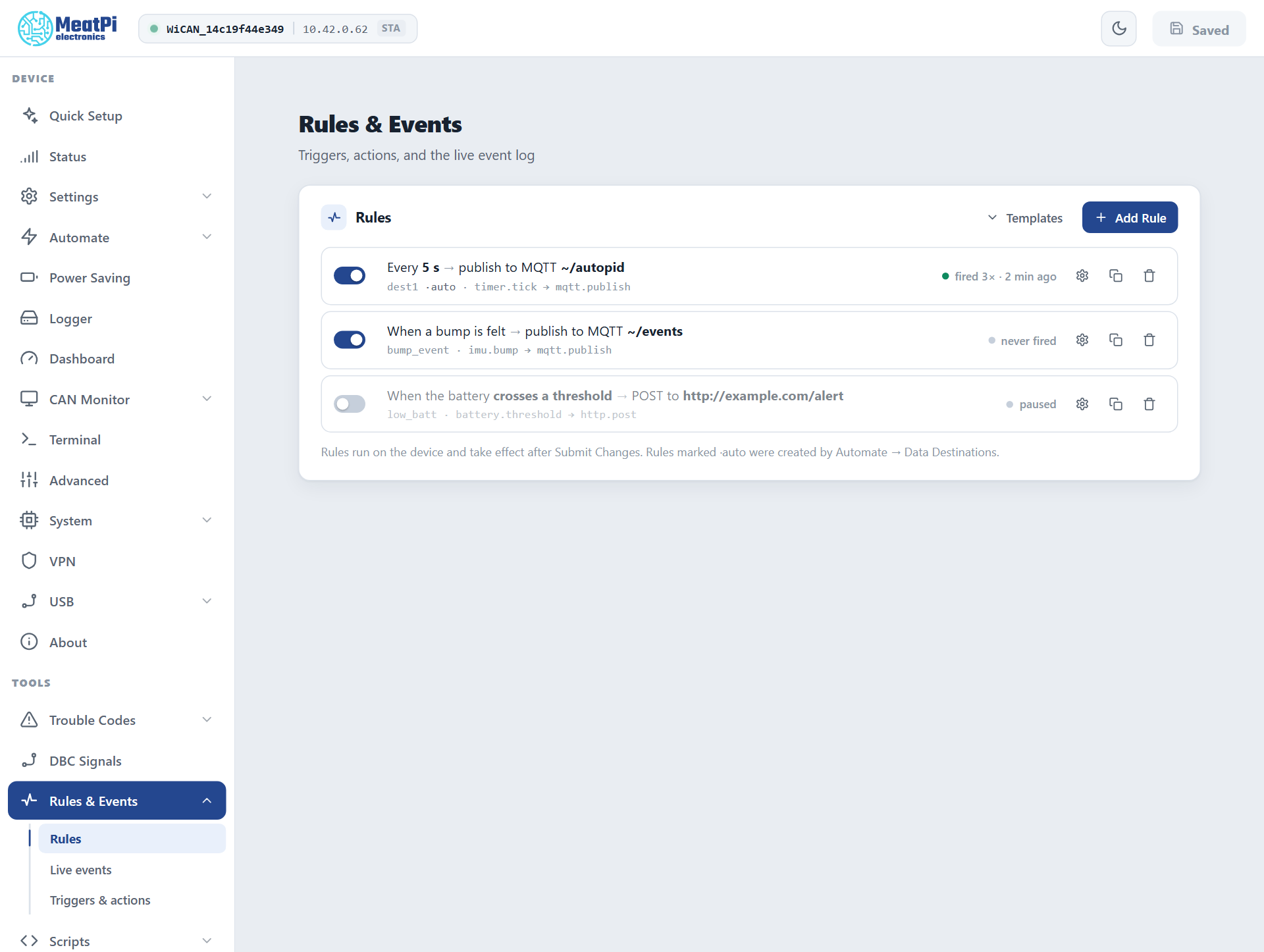
Rules live under Rules & Events: Rules (the list and the builder), Live events (the last events and which rules fired) and Triggers & actions (everything a rule can use on this firmware).
Make a rule
-
Add Rule, or pick a Template (slow polling at home, extra PIDs while charging, alert on a value, LED on a new trouble code) and adjust it.
-
Name it: letters, digits and underscores, up to 15 characters.
-
When: the trigger. The picker lists every event the device raises, with the fields that identify it: the network for WiFi station, the parameter name for Parameter changed, the status bit, the MQTT topic, or a period for Timer (which creates a timer named after the rule).
-
Only if: up to four conditions, each a field, an operator (
==,!=,>,>=,<,<=,changed,contains) and a value. Fields are the trigger's own (the value that changed, the edge, the state) and every live value the device offers, markedLIVE: a parameter, the battery voltage, the network name, the time. All conditions must hold. -
Then: the action and its form: the group and rate for Poll a group, the colour and mode for LED, the topic and payload for MQTT publish, the URL and body for HTTP post, the script name for Run script.
-
Undo, for actions that can reverse themselves (Poll a group, LED): the rule becomes a while rule. The action runs when the conditions come true and reverses when they stop holding, on the next trigger or on the device's one-second re-check of live values.
-
Add. The rule is staged; Submit Changes in the header applies it (WiCAN restarts).
Edit as JSON shows the rule in the form the device stores; the two round-trip.
Triggers
| Trigger | Fields | Raised when |
|---|---|---|
timer.tick |
timer |
a timer of this rule set fires |
autopid.param |
param, value, unit, group |
a polled parameter changed (rate-limited by the AutoPID event interval) |
autopid.pid_failed, autopid.scan_done |
pid, streak; found |
a poll failed; the standard-PID scan finished |
autopid.vehicle_changed, autopid.vehicle_evicted |
vin, name, known |
the current car changed; the store dropped a car |
autopid.dtc, autopid.dtc_scan, autopid.dtc_clear |
code, status, mil; ok, stored, pending, permanent, new, mil; ok, cleared, before, after |
a new trouble code; a scan finished; a clear finished |
battery.threshold |
edge, volts |
the battery crossed 12.0 V going down or 12.5 V going up, held 5 s |
imu.motion, imu.bump |
state; axes |
sustained motion started or stopped; a knock or door slam |
wifi.sta |
connected, ssid |
the station joined a network or lost it |
status.bit |
bit, set |
any device status bit changed (sta_connected, ble_connected, mqtt_connected, motion, time_synced ...) |
mqtt.rx |
topic, payload |
a message arrived on a topic a rule names |
vpn.state |
connected |
the VPN tunnel came up or went down |
sleep.entering, sleep.state |
volts; state, volts |
the device is about to sleep; the sleep ladder moved |
usb.device, usb.eth |
attached; connected, ip |
a USB accessory came or went; the wired uplink got or lost an address |
obd.response, uds.response |
cmd, response; ok, nrc, len, data, req |
the answer to an OBD or UDS request action |
script.done |
value |
a script emitted its result |
logger.rotated, logger.error |
file; count |
a log file rotated; a storage write failed |
Actions
| Action | Parameters | Does |
|---|---|---|
mqtt.publish |
topic, payload, qos, retain |
publishes through the MQTT connection; ~/x is relative to the device's prefix |
http.post |
url, body, content_type |
posts a body to a URL (no retries) |
log.note |
message |
writes a line to the device log |
led.indicate (undoable), led.clear |
r, g, b, mode |
lights the LED's alert slot; clears it |
autopid.group (undoable) |
group, enabled, period_ms |
switches a polling group on or off or changes its rate until the undo or the next restart |
autopid.dtc_scan, autopid.dtc_clear |
; codes, mode |
a trouble-code scan; a clear with the same modes as the page |
logger.enable, logger.disable, logger.write |
; ; source, name, value |
pause or resume the logger; write one value to the parameter stream |
obd.request, uds.request |
cmd; tx, rx, req, ext |
an OBD chip command; a UDS request (the answer comes back as a trigger) |
script.run |
name |
runs a stored script with the trigger's fields as globals |
Fields in an action can carry ${key} templates: the trigger's fields (${value}, ${volts}), the built-ins ${ts}, ${source}, ${name}, and the live values below.
Live values
${autopid.<parameter>} (any polled parameter), ${autopid.data} (the whole snapshot as JSON), ${battery.voltage}, ${wifi.ssid}, ${wifi.connected}, ${time.iso}, ${time.epoch}. In a condition they make "charging and the state of charge above 20 percent" one rule; in an action they fill a payload.
Examples
A new device ships three rules, all publishing to ~/events over MQTT: a bump, a change of motion state, and a battery threshold. The builder's templates cover the common wishes; here are two in the stored form, for Edit as JSON.
Poll slowly while the car is at home, and go back to the configured rate when it leaves:
{"name": "home_slow", "on": "wifi.sta", "match": {"ssid": "HomeWiFi"},
 "when": [{"key": "connected", "op": "==", "val": true}],
 "do": "autopid.group", "with": {"group": "default", "enabled": true, "period_ms": 10000},
 "undo": true}
Alert when the engine runs fast, at most once a minute:
{"name": "high_rpm", "on": "autopid.param", "match": {"param": "EngineRPM"},
 "when": [{"key": "value", "op": ">", "val": 3000}],
 "do": "mqtt.publish", "with": {"topic": "~/alerts", "payload": "{\"rpm\": ${value}, \"at\": \"${time.iso}\"}"},
 "cooldown_ms": 60000}
State goes in the conditions, identity in the trigger
For a rule that undoes itself, keep the trigger's state (connected, edge, state) in Only if and only the identity (the network, the parameter, the topic) in the trigger. The builder does this by itself; in JSON a state put into match would hide the opposite event from the undo.
How rules run
- Events queue up (32 deep, the oldest dropped when full) and one dispatcher evaluates every rule in order. Quick actions (log, MQTT, LED, polling groups) run right there; slow ones (HTTP post, OBD and UDS requests) go to two worker tasks so a slow server never stalls the rest.
cooldown_mskeeps a rule from firing again within that time.changedcompares with the value at the previous event, per boot.- There are no retries: an action that fails is counted (the Live events page shows the counters) and the next event gets another chance.
- Up to 16 rules and 4 timers.
Troubleshooting
| Symptom | Likely cause | What to do |
|---|---|---|
| The rule never fires | the trigger's identity does not match (parameter name, network, topic), or the rule is not submitted yet | check Live events for the event and its fields; Submit Changes |
| It fires but nothing happens | the action failed (broker not connected, URL unreachable) | the counters on Live events; the device log |
| A while rule never undoes | its state field sits in the trigger's match | move it to Only if |
| It fires too often | no cooldown, or autopid.param on a noisy value |
a cooldown, or a changed condition |