MQTT
WiCAN PRO keeps one connection to an MQTT broker, and everything that publishes goes through it: the vehicle parameters, a status topic, messages from rules, and raw CAN frames if you want them. Home Assistant does not need it (it uses the webhook), but Node-RED, Grafana, openHAB, a fleet server or your own scripts do.
Set it up
Settings › MQTT, then Submit in the header (WiCAN restarts). Quick Setup's MQTT broker use case fills in the same card and adds the vehicle data destination for you.
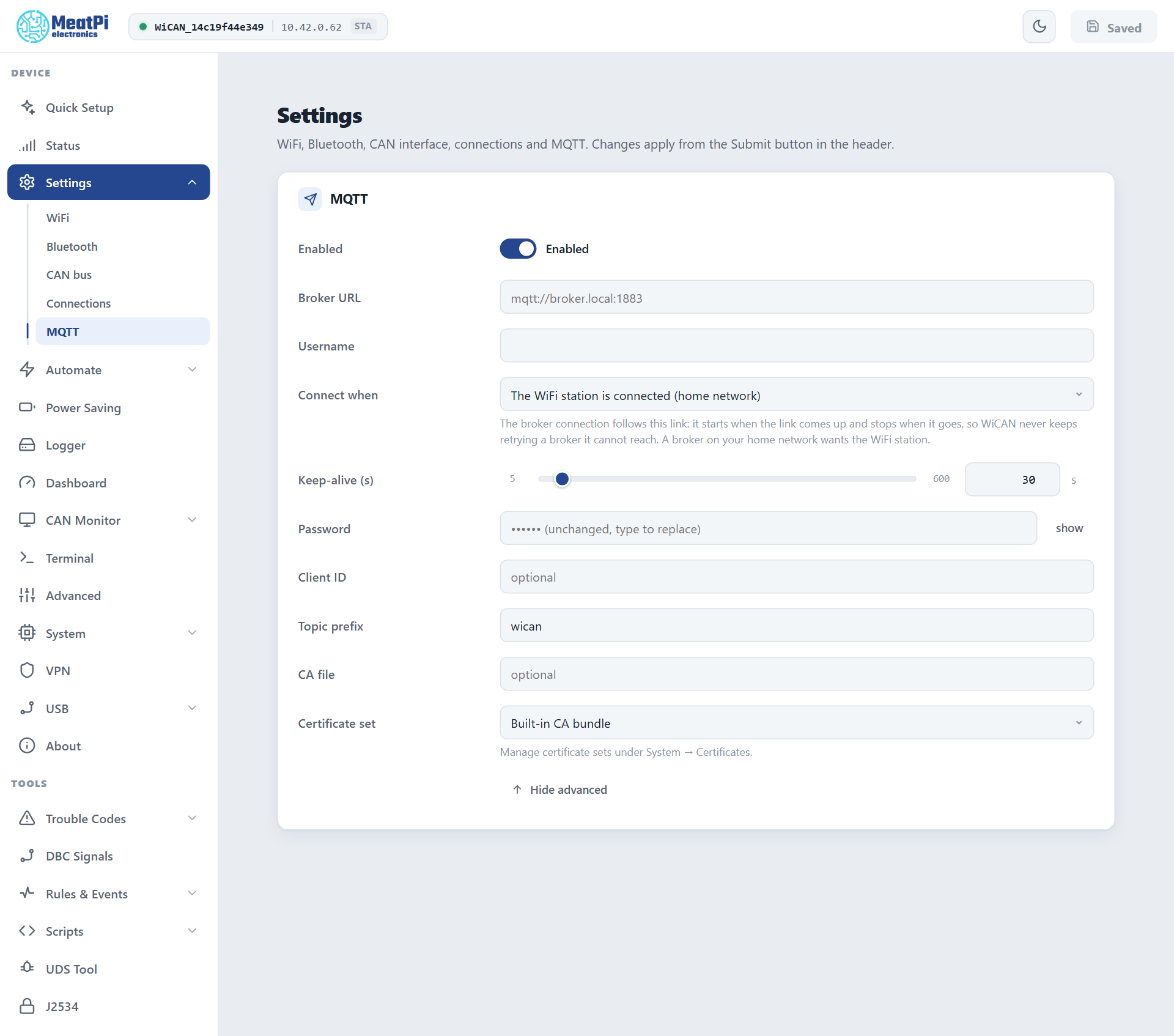
- Broker URL
mqtt://host:1883for a plain connection,mqtts://host:8883for TLS. A host name works when your network resolves it; an address always does.- Username, Password
- When the broker asks for them. The password is write-only: the field shows dots once saved.
- Connect when
- The WiFi station is connected (the default: a broker on your home network) or Any network (WiFi, a USB Ethernet adapter, the dongle). The connection starts when that link comes up and stops when it goes, so WiCAN never keeps retrying a broker it cannot reach.
- Keep-alive
- 5 to 600 s, 30 s by default.
- Client ID
- Blank means
wican_<device id>. - Topic prefix
- Blank means
wican/<device id>. Every topic below hangs off it. - Certificate set, CA file
- For
mqtts://. Public brokers verify against the built-in certificate bundle. A private broker wants a certificate set from System › Certificates with its CA; add a client certificate and key to the set for mutual TLS. CA file takes a PEM file path instead of a set.
The Status page shows MQTT connected once the session is up.
What WiCAN publishes
The topics on the bench device, as seen with mosquitto_sub -v on the broker:
wican/68ee8f5a653d/status {"status": "online"}
wican/68ee8f5a653d/autopid {"EngineCoolantTemp":90,"EngineRPM":800,"VehicleSpeed":0,"timestamp":1791570316}
| Topic | Payload | When |
|---|---|---|
<prefix>/status |
{"status": "online"}, retained. The broker publishes {"status": "offline"} on the same topic by itself when WiCAN drops off (the last will). |
On connect; on loss. |
<prefix>/autopid |
The live parameter set, flat, with a timestamp (seconds since 1970). Retained by default, so a new subscriber gets the last snapshot at once. |
Every 5 s by default. This is a data destination row (Automate › Data destinations): change its topic, interval and retain flag there, or add more rows. |
| Any topic | Whatever a rule publishes with its MQTT action: an alert when the battery drops, a code from a DTC scan. | When the rule fires (Automate rules). |
<prefix>/can/rx |
Batches of raw CAN frames. | Only with CAN over MQTT switched on, below. |
In a topic field ~ stands for the prefix: ~/autopid is wican/<device id>/autopid.
A dashboard that wants a dead state for a parked car can watch <prefix>/status: it goes offline within the keep-alive time after WiCAN sleeps or loses its network.
CAN over MQTT
Raw frames both ways, for a bus tool on another machine. The bridge is switched off and both directions are gated, so an enabled bridge moves nothing until each direction is allowed on purpose. Find it under All Settings › CAN over MQTT:
- Enabled
- Creates the bridge. Off by default.
- Allow RX
- Frames heard on the bus may leave WiCAN on the publish topic. Off by default.
- Allow TX
- Frames received from the broker may go onto the bus. Off by default. Think before enabling this on a vehicle bus.
- Publish topic, Subscribe topic
~/can/rxand~/can/tx.- Batching
- Frames are gathered into one message per 50 ms or 24 frames, whichever comes first. Bigger batches cost fewer messages.
- Filter, Mask
- A CAN id filter on what is published (hex; empty = everything).
The bus itself must be on: Settings › CAN bus with the car's bit rate. Frames are JSON, the same shape in both directions:
{"bus":"0","type":"rx","ts":34610,"frame":[{"id":123,"dlc":8,"rtr":false,"extd":false,"data":[1,2,3,4,5,6,7,8]}]}
To transmit, publish the same shape with "type":"tx" to the subscribe topic; ts is ignored and extd is implied for ids above 0x7FF.
Troubleshooting
| Symptom | Likely cause | What to do |
|---|---|---|
MQTT connected never shows |
wrong scheme or port, or the broker is not reachable from the network WiCAN is on | check mqtt:// versus mqtts:// and the port; try the broker from a phone on the same network |
| Connected at home, never in the car | Connect when is WiFi and the car has no WiFi, or the broker is on the home LAN | a broker reachable from the internet (TLS and a password), and Any network when the dongle or an adapter is the link |
mqtts:// fails |
the broker's certificate is not trusted | a certificate set with the broker's CA under System › Certificates |
status says online but no values |
the vehicle destination row is off, polling is paused, or the ignition is off | Automate › Data destinations; Automate › Settings; ignition on |
| Frames missing at high bus load | the link cannot carry the message rate | raise the batch size, or filter what is published |