Recovery over USB
When the web interface is out of reach, a forgotten access point password, a configuration that locked you out, an update that did not complete, the firmware can be written over the USB cable with Espressif's flashing tool. Erasing the flash on the way is the factory reset: the device starts again as new, with the access point `WiCAN_
- You need
- A USB data cable, a computer, the firmware zip for your device from
https://github.com/meatpiHQ/wican-fw/releases, and the flashing tool: the web tool athttps://espressif.github.io/esptool-js/in Chrome or Edge, oresptool.py(pip install esptool) - The files
- The four files in the zip:
bootloader.bin,partition-table.bin,ota_data_initial.binand the firmware.bin - Keeps
- Nothing, if you erase first: every setting and the Automate tables are gone. Flashing without the erase keeps them
Put the device in download mode
The device enters download mode when two pads on the board are shorted while power is applied. Open the case, hold the two pads together with tweezers or a jumper wire, and plug in the USB cable while holding them; one LED lights to say the device is waiting for the download. Release the pads once the cable is in.
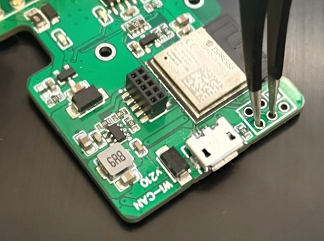
The computer sees a serial port: a COM port on Windows, /dev/ttyACM0 or /dev/ttyUSB0 on Linux, /dev/cu.usbmodem... on macOS. On an old Windows without a driver for it, install the WCH CH343 serial driver package.
Flash
The four files go to four addresses:
| File | Address |
|---|---|
bootloader.bin |
0x0 |
partition-table.bin |
0x8000 |
ota_data_initial.bin |
0xd000 |
wican-fw_obd_vXXX.bin or wican-fw_usb_vXXXu.bin |
0x10000 |
With the web tool: open https://espressif.github.io/esptool-js/, Connect, pick the port. Erase first when the configuration is the problem. Then add the four files with their addresses and Program. Unplug and replug the cable when it is done.
With esptool.py, with the port name of your computer:
esptool.py --chip esp32c3 --port COM5 erase_flash
esptool.py --chip esp32c3 --port COM5 write_flash 0x0 bootloader.bin 0x8000 partition-table.bin 0xd000 ota_data_initial.bin 0x10000 wican-fw_obd_vXXX.bin
Leave out the first line to keep the settings. After the second line, unplug and replug the cable: WiCAN starts the new firmware, with the factory settings if the flash was erased. Join WiCAN_<device id> with @meatpi# and set it up again, see First setup.
Troubleshooting
| Symptom | Likely cause | What to do |
|---|---|---|
| No serial port appears | a charge-only cable, or no driver | a data cable; the driver |
The tool cannot connect, Failed to connect |
the device is not in download mode | unplug, hold the pads shorted, plug in again, then connect |
| The tool connects but writing fails half way | a loose cable, or power from the car at the same time | the cable; nothing but USB during the flash |
| The device starts but the web interface is odd | the wrong image (an obd image on a USB device or the other way round) |
the image for your device |
| The old settings are still there | the flash was not erased | erase, then flash |