MQTT
WiCAN keeps one connection to an MQTT broker on your network and uses it for three things: raw CAN frames in both directions, the AutoPID values, and a small command channel. Home Assistant does not need it (it uses the webhook), but Node-RED, Grafana, openHAB and your own scripts do.
Set it up
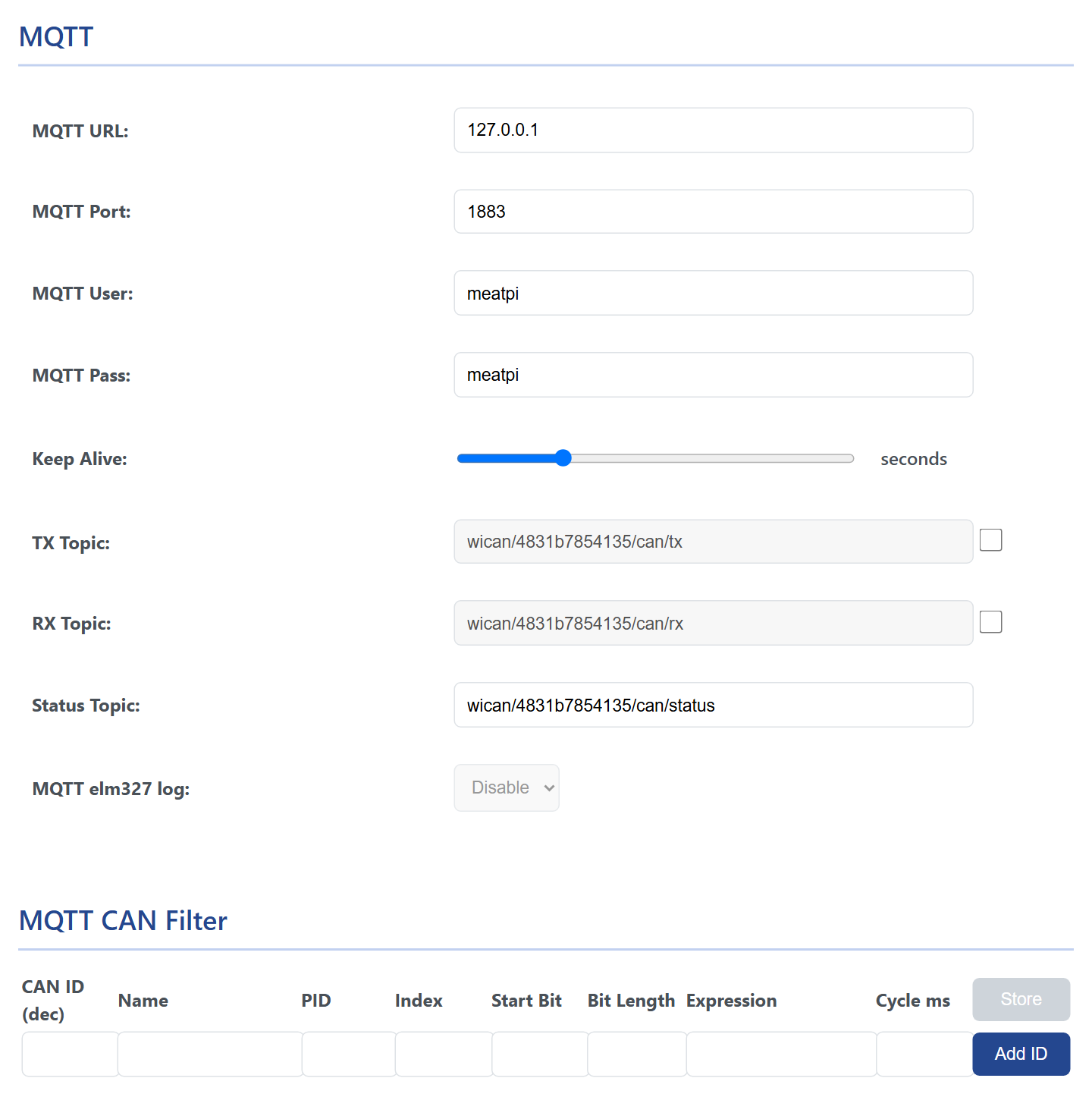
- Put WiCAN on your network: AP+Station mode, see WiFi. The MQTT client only starts once the station is connected.
- Under Settings › CAN, set MQTT to Enable. The MQTT card appears below the BLE card.
- Fill in the broker and press Submit Changes.
- MQTT URL
- The broker's address or host name, without a scheme:
192.168.1.20orhomeassistant.local. WiCAN speaks plain MQTT only, no TLS, so use a broker on your own network, never a public one. - MQTT Port
- 1883 unless your broker listens elsewhere.
- MQTT User, MQTT Pass
- The login the broker expects. A broker that allows anonymous clients ignores them.
- Keep Alive
- 2 to 120 seconds, 30 from the factory: how quickly the broker notices that WiCAN is gone.
- TX Topic
wican/<device id>/can/tx: frames published here by anyone are sent onto the bus. The checkbox switches this on; off, WiCAN does not subscribe.- RX Topic
wican/<device id>/can/rx: the frames WiCAN hears on the bus, in batches. The checkbox switches the raw frames on; the AutoPID values use this topic too when no other destination is set.- Status Topic
wican/<device id>/can/status:{"status": "online"}when WiCAN connects, retained, and{"status": "offline"}from the broker when it drops off (the last will).- MQTT elm327 log
- Only with Protocol elm327: the frames the ELM327 interpreter sends and receives for an app are copied to
wican/<device id>/elm327, for watching what an app asks the car. Raw frames are not published while it is on.
The topics can be renamed, 1 to 32 characters each. The device id in them lets several WiCANs share one broker.
MQTT and Bluetooth do not mix
Enabling Bluetooth LE switches MQTT off: the page hides the card and the firmware does not start the client. MQTT also needs AP+Station mode, in which Bluetooth is not available, so the two never run together.
What WiCAN publishes
The topics on the bench device, as seen with mosquitto_sub -v on the broker, with AutoPID reading three standard PIDs and two custom PIDs:
wican/4831b7854135/can/status {"status": "online"}
wican/4831b7854135/rpm {"RPM_custom":716}
wican/4831b7854135/speed 173.00
wican/4831b7854135/autopid {"RPM_custom":716,"Speed_wallbox":173,"0C-EngineRPM":716,"0D-VehicleSpeed":173,"05-EngineCoolantTemp":21}
| Topic | Payload | When |
|---|---|---|
<status topic> |
{"status": "online"}, retained; {"status": "offline"} from the broker when the connection is lost |
on connect; on loss |
<rx topic> |
batches of raw frames, {"bus":"0","type":"rx","ts":34610,"frame":[{"id":2024,"dlc":8,"rtr":false,"extd":false,"data":[4,65,12,26,248,170,170,170]}]} |
with the RX checkbox on, as frames arrive |
| the AutoPID Destination | the grouped snapshot, retained | every cycle, see AutoPID |
| a row's Send_to | {"name": value} for the MQTT_Topic type, or the bare number for MQTT_WallBox, retained |
every reading of that row |
<rx topic> with a CAN filter |
{"EngineSpeed": 1165.000000}, one message per filter rule |
every rule's cycle, see below |
wican/<device id>/elm327 |
frames of type tx and rx as above |
with the elm327 log on |
wican/<device id>/cmd |
the answer to a command, next to the command itself | after a command |
The command topic takes a JSON object {"cmd": "..."} and answers on the same topic:
| Command | Does | Answer |
|---|---|---|
reboot |
restarts WiCAN | {"rsp": "ok"} |
get_vbatt |
reads the battery voltage | {"battery_voltage": 11.599999} |
get_autopid_data |
asks for one AutoPID round when Polling is disabled | the values on their usual topics |
Sending frames onto the bus
With the TX checkbox on, publish a frame to the TX topic and WiCAN transmits it:
{"bus": "0", "type": "tx", "frame": [{"id": 2015, "dlc": 8, "rtr": false, "extd": false, "data": [2, 1, 70, 170, 170, 170, 170, 170]}]}
id is decimal (2015 is 0x7DF, the OBD-II broadcast address; 0x18DB33F1 for 29-bit cars), extd true for a 29-bit id, data the bytes. The example asks for ambient air temperature (service 01, PID 46); the car's answer arrives on the RX topic. A frame published this way goes out whatever the protocol setting, as long as MQTT is connected.
The MQTT CAN Filter: frames into values

Instead of publishing every raw frame, WiCAN can pick a field out of a frame, compute a value and publish it on its own schedule. As soon as one filter rule exists, raw frames are no longer published: only the values of the rules are.
| Column | What to enter |
|---|---|
| CAN ID (dec) | The id of the frame, in decimal: 2024 for the engine's OBD answers (0x7E8). |
| Name | The key of the value in the JSON, up to 16 characters. |
| PID | For an OBD answer, the PID the frame answers (12 for engine speed, 0x0C); -1 for a frame that is not an OBD answer. |
| Index | Which byte of the frame holds the PID, 2 for standard OBD answers. |
| Start Bit, Bit Length | Where the field is, counting bits from the start of the 8 data bytes: byte 3 starts at bit 24. |
| Expression | Arithmetic over V, the extracted field: V*0.25 for engine speed. |
| Cycle ms | How often the value is published, 100 to 10000 ms. |
Add ID adds the row, Store writes the table (CAN filter saved! Filter will take effect after submit.), and Submit Changes restarts WiCAN with it. Up to 100 rules.
Two worked examples, from the frames an engine sends in answer to the standard requests:
| CAN ID | PID | Index | Start Bit | Bit Length | Expression | |
|---|---|---|---|---|---|---|
Engine speed from 7E8 04 41 0C 12 34 ... |
2024 | 12 | 2 | 24 | 16 | V*0.25 |
Vehicle speed from 7E8 03 41 0D 17 ... |
2024 | 13 | 2 | 24 | 8 | V |
A frame that is not an OBD answer, say id 356 with the value in bytes 2 and 3: PID -1, Start Bit 16, Bit Length 16, and an expression such as (V+10)/2.5. The published value is {"Name": value} on the RX topic.
Troubleshooting
| Symptom | Likely cause | What to do |
|---|---|---|
| Nothing on the status topic | WiCAN is not on the network, Bluetooth is enabled, the broker address or port is wrong, or the broker refuses the login | the Status tab's WiFi Station; BLE Status Disable; the broker's log |
online arrives, no frames |
the RX checkbox is off, a filter rule exists, or the bus is quiet | the checkbox; the filter table; the ignition |
online arrives, no AutoPID values |
grouping off and rows of the Default type, or the protocol is not AutoPID | AutoPID |
| Frames published to the TX topic do nothing | the TX checkbox is off, or the JSON is not in the shape above | the checkbox; id and data as numbers, rtr and extd as booleans |
| The broker drops WiCAN every minute | keep alive too short for a weak WiFi link | a longer Keep Alive |
Data length exceeds the data size arrives |
a message larger than WiCAN's buffer was requested | fewer rows per message: a shorter cycle, or fewer frames |